| New file |
| | |
|---|
| | | # JSON 格式错误修正说明 |
|---|
| | | |
|---|
| | | ## 问题描述 |
|---|
| | | |
|---|
| | | 原始的 `HomeAssistant集成-选项卡.json` 文件存在严重的 JSON 格式错误: |
|---|
| | | |
|---|
| | | 1. **转义字符错误**: 文件中出现了大量不正确的转义字符(如 `\n`、`\"`) |
|---|
| | | 2. **属性名格式错误**: JSON 属性名缺少正确的双引号格式 |
|---|
| | | 3. **语法结构错误**: 括号、逗号等语法符号错位 |
|---|
| | | |
|---|
| | | ## 修正内容 |
|---|
| | | |
|---|
| | | 已创建修正版文件:`HomeAssistant集成-选项卡-修正版.json` |
|---|
| | | |
|---|
| | | ### 修正的主要问题: |
|---|
| | | |
|---|
| | | 1. **修正了所有转义字符错误** |
|---|
| | | - 原始:`\"type\": \"mqtt out\"` |
|---|
| | | - 修正:`"type": "mqtt out"` |
|---|
| | | |
|---|
| | | 2. **修正了属性名格式** |
|---|
| | | - 所有属性名现在都使用正确的双引号格式 |
|---|
| | | |
|---|
| | | 3. **修正了 JavaScript 代码中的转义** |
|---|
| | | - 在 `func` 属性中的 JavaScript 代码现在使用正确的转义格式 |
|---|
| | | |
|---|
| | | 4. **修正了 JSON 结构** |
|---|
| | | - 所有括号、逗号、引号都正确配对 |
|---|
| | | |
|---|
| | | ## 使用方法 |
|---|
| | | |
|---|
| | | ### 方法1:替换原文件 |
|---|
| | | 1. 删除或重命名原始的 `HomeAssistant集成-选项卡.json` |
|---|
| | | 2. 将 `HomeAssistant集成-选项卡-修正版.json` 重命名为 `HomeAssistant集成-选项卡.json` |
|---|
| | | |
|---|
| | | ### 方法2:直接使用修正版 |
|---|
| | | 1. 在 Node-RED 中导入 `HomeAssistant集成-选项卡-修正版.json` |
|---|
| | | 2. 删除之前可能导入失败的节点 |
|---|
| | | |
|---|
| | | ## 文件内容说明 |
|---|
| | | |
|---|
| | | 修正版文件包含以下功能节点: |
|---|
| | | |
|---|
| | | ### 1. 自动发现功能 |
|---|
| | | - `ha_discovery_trigger`: 启动自动发现的触发器 |
|---|
| | | - `ha_discovery_function`: 生成 HomeAssistant 自动发现配置 |
|---|
| | | - `ha_discovery_split`: 分割发现消息 |
|---|
| | | - `ha_discovery_mqtt`: 发送自动发现配置到 MQTT |
|---|
| | | |
|---|
| | | ### 2. 数据处理功能 |
|---|
| | | - `ha_data_processor`: 处理来自集中供液系统的数据 |
|---|
| | | - `ha_data_mqtt`: 发送处理后的数据到 HomeAssistant |
|---|
| | | - `ha_data_debug`: 调试输出 |
|---|
| | | |
|---|
| | | ### 3. 测试功能 |
|---|
| | | - `ha_test_inject`: 单个数据测试 |
|---|
| | | - `ha_batch_processor`: 批量数据处理器 |
|---|
| | | - `ha_batch_split`: 分割批量消息 |
|---|
| | | - `ha_batch_mqtt`: 批量发送到 HomeAssistant |
|---|
| | | - `ha_batch_test`: 批量测试数据 |
|---|
| | | |
|---|
| | | ### 4. MQTT 连接 |
|---|
| | | - `mqtt_broker_ha`: HomeAssistant MQTT 连接配置 |
|---|
| | | |
|---|
| | | ## 下一步操作 |
|---|
| | | |
|---|
| | | 1. **导入修正版文件**: 在 Node-RED 中导入修正版配置 |
|---|
| | | 2. **检查 MQTT 连接**: 确认 HomeAssistant MQTT broker 地址正确 |
|---|
| | | 3. **启动自动发现**: 点击"启动自动发现"节点 |
|---|
| | | 4. **测试数据流**: 使用测试节点验证功能 |
|---|
| | | 5. **连接实际数据**: 将集中供液系统的实际数据连接到数据处理器 |
|---|
| | | |
|---|
| | | ## 验证步骤 |
|---|
| | | |
|---|
| | | 1. **JSON 验证**: 使用 JSON 验证工具确认文件格式正确 |
|---|
| | | 2. **Node-RED 导入**: 成功导入到 Node-RED 无错误 |
|---|
| | | 3. **节点部署**: 所有节点能正常部署 |
|---|
| | | 4. **MQTT 连接**: MQTT broker 连接状态正常 |
|---|
| | | 5. **数据流测试**: 测试数据能正常流转 |
|---|
| | | |
|---|
| | | 现在您可以使用修正版文件来正常设置 HomeAssistant 集成功能了。 |
|---|
| New file |
| | |
|---|
| | | ## node-red如何连接modbus slave设备 |
|---|
| | | |
|---|
| | | ### 说明 |
|---|
| | | 我想在node-red中用流程图中配置modbus master主设备通过mocbus tcp rtu去联接modbus slave设备,如何配置呢? |
|---|
| | | |
|---|
| | | ### 步骤一:安装Modbus相关节点 |
|---|
| | | 1. 打开Node-RED编辑器(浏览器访问 http://<你的设备IP>:1880)。 |
|---|
| | | 2. 点击右上角菜单,选择“Manage palette(管理调色板)”。 |
|---|
| | | 3. 在“Install”标签页中搜索 `node-red-contrib-modbus`,点击“Install”安装。 |
|---|
| | | |
|---|
| | | ### 步骤二:添加Modbus TCP/RTU节点 |
|---|
| | | 1. 安装完成后,左侧会出现“modbus”类别。 |
|---|
| | | 2. 拖拽 `modbus-read` 或 `modbus-write` 节点到流程图中。 |
|---|
| | | 3. 双击节点,点击“Server”右侧的铅笔图标,新增Modbus服务器配置。 |
|---|
| | | |
|---|
| | | ### 步骤三:配置Modbus主设备(Master) |
|---|
| | | - **连接类型**: |
|---|
| | | - 如果是TCP,选择“TCP”,填写Slave设备的IP和端口(通常为502)。 |
|---|
| | | - 如果是RTU(串口),选择“Serial”,填写串口设备(如`/dev/ttyUSB0`)、波特率、数据位、校验等参数。 |
|---|
| | | - **Unit-Id**:填写目标Slave的地址(通常为1)。 |
|---|
| | | - 其他参数按实际需求设置。 |
|---|
| | | |
|---|
| | | ### 步骤四:配置读写操作 |
|---|
| | | - `modbus-read` 节点:设置功能码(如03读保持寄存器)、起始地址、长度、轮询间隔等。 |
|---|
| | | - `modbus-write` 节点:设置功能码、目标地址、写入数据等。 |
|---|
| | | |
|---|
| | | #### Modbus-Read节点参数填写说明 |
|---|
| | | - **名称**:自定义,便于识别。 |
|---|
| | | - **主题(Topic)**:可留空或自定义(如用于消息分流时填写),一般默认即可。 |
|---|
| | | - **Unit-Id**:填写目标 Modbus slave 设备的地址(通常为1,具体看你的设备设置)。 |
|---|
| | | - **FC(功能码)**:选择你要执行的Modbus功能码,常用如下: |
|---|
| | | - 1:读线圈(Coil Status) |
|---|
| | | - 2:读离散输入(Input Status) |
|---|
| | | - 3:读保持寄存器(Holding Registers,最常用) |
|---|
| | | - 4:读输入寄存器(Input Registers) |
|---|
| | | - **Address**:要读取的寄存器或线圈的起始地址(通常从0或1开始,具体看设备手册)。 |
|---|
| | | - **Quantity**:读取的数量(如要读2个寄存器就填2)。 |
|---|
| | | - **Poll Rate**:轮询周期,单位为毫秒(如1000表示每秒读取一次)。 |
|---|
| | | |
|---|
| | | 举例(读取slave地址为1,保持寄存器,起始地址0,数量2,每秒轮询): |
|---|
| | | - Unit-Id:1 |
|---|
| | | - FC:3 |
|---|
| | | - Address:0 |
|---|
| | | - Quantity:2 |
|---|
| | | - Poll Rate:1000 |
|---|
| | | |
|---|
| | | ### 步骤五:部署与调试 |
|---|
| | | 1. 连接节点,点击右上角“部署”。 |
|---|
| | | 2. 查看debug面板,确认数据是否正常收发。 |
|---|
| | | |
|---|
| | | ### 参考示例 |
|---|
| | | ```text |
|---|
| | | [modbus-read] → [debug] |
|---|
| | | ``` |
|---|
| | | |
|---|
| | | ### 常见问题 |
|---|
| | | - 确认物理连接和串口权限。 |
|---|
| | | - TCP模式下防火墙需放行502端口。 |
|---|
| | | - RTU模式下需正确配置串口参数。 |
|---|
| | | |
|---|
| | | 如需更详细的配置说明,可参考[node-red-contrib-modbus官方文档](https://flows.nodered.org/node/node-red-contrib-modbus) |
|---|
| New file |
| | |
|---|
| | | @node-red-contrib-themes/theme-collection |
|---|
| | | 4.0.11 |
|---|
| | | node-red |
|---|
| | | 4.0.9 |
|---|
| | | node-red-contrib-aedes |
|---|
| | | 0.6.0 |
|---|
| | | node-red-contrib-bigtimer |
|---|
| | | 2.8.6 |
|---|
| | | node-red-contrib-cast |
|---|
| | | 0.2.17 |
|---|
| | | node-red-contrib-counter |
|---|
| | | 0.1.6 |
|---|
| | | node-red-contrib-cron-plus |
|---|
| | | 2.1.0 |
|---|
| | | node-red-contrib-home-assistant-websocket |
|---|
| | | 0.77.1 |
|---|
| | | node-red-contrib-influxdb |
|---|
| | | 0.7.0 |
|---|
| | | node-red-contrib-interval-length |
|---|
| | | 0.0.6 |
|---|
| | | node-red-contrib-lvin-crc16 |
|---|
| | | 1.0.2 |
|---|
| | | node-red-contrib-md5 |
|---|
| | | 1.0.4 |
|---|
| | | node-red-contrib-modbus |
|---|
| | | 5.43.0 |
|---|
| | | node-red-contrib-moment |
|---|
| | | 5.0.0 |
|---|
| | | node-red-contrib-mqtt-broker |
|---|
| | | 0.2.9 |
|---|
| | | node-red-contrib-persistent-fsm |
|---|
| | | 1.2.1 |
|---|
| | | node-red-contrib-sunevents |
|---|
| | | 3.1.1 |
|---|
| | | node-red-contrib-time-range-switch |
|---|
| | | 1.2.0 |
|---|
| | | node-red-dashboard |
|---|
| | | 3.6.5 |
|---|
| | | node-red-node-base64 |
|---|
| | | 1.0.0 |
|---|
| | | node-red-node-email |
|---|
| | | 3.0.3 |
|---|
| | | node-red-node-feedparser |
|---|
| | | 0.3.0 |
|---|
| | | node-red-node-ping |
|---|
| | | 0.3.3 |
|---|
| | | node-red-node-random |
|---|
| | | 0.4.1 |
|---|
| | | node-red-node-serialport |
|---|
| | | 2.0.3 |
|---|
| | | node-red-node-smooth |
|---|
| | | 0.1.2 |
|---|
| | | node-red-node-suncalc |
|---|
| | | 1.2.0 |
|---|
| | | node-red-node-twitter |
|---|
| | | 1.2.0 |
|---|
| | | |
|---|
| New file |
| | |
|---|
| | | ## 如何安装node-red安装到orangepi Zero3 |
|---|
| | | |
|---|
| | | |
|---|
| | | ### 操作系统 |
|---|
| | | 基于ubuntu的操作系统的orangepizero3定制版 |
|---|
| | | |
|---|
| | | ### 安装步骤 |
|---|
| | | |
|---|
| | | #### 1. 更新系统 |
|---|
| | | 在终端执行以下命令,确保系统为最新: |
|---|
| | | |
|---|
| | | ```bash |
|---|
| | | sudo apt-get update && sudo apt-get upgrade -y |
|---|
| | | ``` |
|---|
| | | |
|---|
| | | #### 2. 安装Node-RED |
|---|
| | | Node-RED官方提供了一键安装脚本,适用于Debian/Ubuntu系统: |
|---|
| | | |
|---|
| | | ```bash |
|---|
| | | bash <(curl -sL https://raw.githubusercontent.com/node-red/linux-installers/master/deb/update-nodejs-and-nodered) |
|---|
| | | ``` |
|---|
| | | |
|---|
| | | 安装过程中可根据提示选择“y”继续。 |
|---|
| | | |
|---|
| | | #### 3. 启动与停止Node-RED |
|---|
| | | - 启动: |
|---|
| | | ```bash |
|---|
| | | node-red-start |
|---|
| | | ``` |
|---|
| | | - 停止: |
|---|
| | | ```bash |
|---|
| | | node-red-stop |
|---|
| | | ``` |
|---|
| | | - 查看日志: |
|---|
| | | ```bash |
|---|
| | | node-red-log |
|---|
| | | ``` |
|---|
| | | |
|---|
| | | #### 4. 设置开机自启 |
|---|
| | | 通常安装脚本会自动设置开机自启,如需手动设置: |
|---|
| | | |
|---|
| | | ```bash |
|---|
| | | sudo systemctl enable nodered.service |
|---|
| | | ``` |
|---|
| | | |
|---|
| | | #### 5. 访问Node-RED |
|---|
| | | 在浏览器访问: |
|---|
| | | |
|---|
| | | ``` |
|---|
| | | http://<你的OrangePi的IP地址>:1880 |
|---|
| | | ``` |
|---|
| | | |
|---|
| | | 可用 `hostname -I` 或 `ip a` 命令查询IP地址 |
|---|
| | | |
|---|
| | | sudo systemctl status nodered.service |
|---|
| | | sudo systemctl start nodered.service |
|---|
| | | sudo systemctl stop nodered.service |
|---|
| | | sudo systemctl restart nodered.service |
|---|
| | | |
|---|
| | | |
|---|
| New file |
| | |
|---|
| | | unning Node-RED install for user orangepi at /home/orangepi on ubuntu |
|---|
| | | |
|---|
| | | [sudo] password for orangepi: |
|---|
| | | |
|---|
| | | This can take 20-30 minutes on the slower Pi versions - please wait. |
|---|
| | | |
|---|
| | | Stop Node-RED ✔ |
|---|
| | | Remove old version of Node-RED ✔ |
|---|
| | | Remove old version of Node.js ✔ |
|---|
| | | Install Node 20.19.3-1nodesource1 ✔ v20.19.3 Npm 10.8.2 |
|---|
| | | Clean npm cache ✔ |
|---|
| | | Install Node-RED core ✔ 4.0.9 |
|---|
| | | Move global nodes to local - |
|---|
| | | Npm rebuild existing nodes ✔ |
|---|
| | | Install extra Pi nodes ✔ |
|---|
| | | Add shortcut commands ✘ |
|---|
| | | Update systemd script ✔ |
|---|
| | | |
|---|
| | | |
|---|
| | | Any errors will be logged to /var/log/nodered-install.log |
|---|
| | | All done. |
|---|
| | | You can now start Node-RED with the command node-red-start |
|---|
| | | or using the icon under Menu / Programming / Node-RED |
|---|
| | | Then point your browser to localhost:1880 or http://{your_pi_ip-address}:1880 |
|---|
| | | |
|---|
| | | Started : Wed Jul 9 12:28:33 PM CST 2025 |
|---|
| | | Finished: Wed Jul 9 12:37:17 PM CST 2025 |
|---|
| | | |
|---|
| | | ********************************************************************************** |
|---|
| | | ### WARNING ### |
|---|
| | | DO NOT EXPOSE NODE-RED TO THE OPEN INTERNET WITHOUT SECURING IT FIRST |
|---|
| | | |
|---|
| | | Even if your Node-RED doesn't have anything valuable, (automated) attacks will |
|---|
| | | happen and could provide a foothold in your local network |
|---|
| | | |
|---|
| | | Follow the guide at https://nodered.org/docs/user-guide/runtime/securing-node-red |
|---|
| | | to setup security. |
|---|
| | | |
|---|
| | | ### ADDITIONAL RECOMMENDATIONS ### |
|---|
| | | - You can customise the initial settings by running: |
|---|
| | | |
|---|
| | | node-red admin init |
|---|
| | | |
|---|
| | | ********************************************************************************** |
|---|
| | | |
|---|
| | | |
|---|
| | | Node-RED Settings File initialisation |
|---|
| | | ===================================== |
|---|
| | | This tool will help you create a Node-RED settings file. |
|---|
| | | |
|---|
| | | ✖ Settings file · /home/orangepi/.node-red/settings.js |
|---|
| | | |
|---|
| | | orangepi@orangepizero3:~$ ^C |
|---|
| | | orangepi@orangepizero3:~$ |
|---|
| New file |
| | |
|---|
| | | // HomeAssistant MQTT 自动发现配置 - 无分割版本 |
|---|
| | | // 每个传感器单独发送,避免分割节点问题 |
|---|
| | | |
|---|
| | | const deviceId = "central_liquid_supply"; |
|---|
| | | const deviceName = "新安国际集中供液系统"; |
|---|
| | | const baseTopic = "homeassistant"; |
|---|
| | | |
|---|
| | | // 设备基本信息 |
|---|
| | | const device = { |
|---|
| | | identifiers: [deviceId], |
|---|
| | | name: deviceName, |
|---|
| | | manufacturer: "新安国际", |
|---|
| | | model: "集中供液系统", |
|---|
| | | sw_version: "1.0" |
|---|
| | | }; |
|---|
| | | |
|---|
| | | // 所有传感器配置 |
|---|
| | | const allSensors = [ |
|---|
| | | { type: "sensor", name: "温度", entity_id: "temperature", unit: "°C", device_class: "temperature" }, |
|---|
| | | { type: "sensor", name: "PH值", entity_id: "ph_value", unit: "pH" }, |
|---|
| | | { type: "sensor", name: "电导率", entity_id: "conductivity", unit: "μS/cm" }, |
|---|
| | | { type: "sensor", name: "储液当前液位", entity_id: "storage_level", unit: "L" }, |
|---|
| | | { type: "sensor", name: "供液一压力", entity_id: "supply_pressure_1", unit: "kPa", device_class: "pressure" }, |
|---|
| | | { type: "sensor", name: "供液二压力", entity_id: "supply_pressure_2", unit: "kPa", device_class: "pressure" }, |
|---|
| | | { type: "binary_sensor", name: "工作状态", entity_id: "work_status", device_class: "running" }, |
|---|
| | | { type: "binary_sensor", name: "报警状态", entity_id: "alarm_status", device_class: "problem" } |
|---|
| | | ]; |
|---|
| | | |
|---|
| | | node.warn(`开始处理 ${allSensors.length} 个传感器配置`); |
|---|
| | | |
|---|
| | | // 逐个发送传感器配置 |
|---|
| | | allSensors.forEach((sensor, index) => { |
|---|
| | | const config = { |
|---|
| | | name: sensor.name, |
|---|
| | | unique_id: `${deviceId}_${sensor.entity_id}`, |
|---|
| | | state_topic: `${deviceId}/${sensor.type}/${sensor.entity_id}/state`, |
|---|
| | | device: device |
|---|
| | | }; |
|---|
| | | |
|---|
| | | // 根据传感器类型添加特定配置 |
|---|
| | | if (sensor.type === "sensor") { |
|---|
| | | config.state_class = "measurement"; |
|---|
| | | if (sensor.unit) config.unit_of_measurement = sensor.unit; |
|---|
| | | if (sensor.device_class) config.device_class = sensor.device_class; |
|---|
| | | } else if (sensor.type === "binary_sensor") { |
|---|
| | | config.device_class = sensor.device_class; |
|---|
| | | config.payload_on = sensor.entity_id === "work_status" ? "运行" : "报警"; |
|---|
| | | config.payload_off = sensor.entity_id === "work_status" ? "停止" : "正常"; |
|---|
| | | } |
|---|
| | | |
|---|
| | | const mqttTopic = `${baseTopic}/${sensor.type}/${deviceId}_${sensor.entity_id}/config`; |
|---|
| | | const mqttPayload = JSON.stringify(config); |
|---|
| | | |
|---|
| | | node.warn(`发送配置 ${index + 1}/${allSensors.length}: ${sensor.name}`); |
|---|
| | | node.warn(` 主题: ${mqttTopic}`); |
|---|
| | | |
|---|
| | | // 立即发送MQTT消息 |
|---|
| | | node.send({ |
|---|
| | | topic: mqttTopic, |
|---|
| | | payload: mqttPayload, |
|---|
| | | retain: true |
|---|
| | | }); |
|---|
| | | |
|---|
| | | // 添加小延迟,确保消息按顺序发送 |
|---|
| | | setTimeout(() => { |
|---|
| | | if (index === allSensors.length - 1) { |
|---|
| | | // 最后发送设备状态 |
|---|
| | | node.send({ |
|---|
| | | topic: `${deviceId}/status`, |
|---|
| | | payload: "online", |
|---|
| | | retain: true |
|---|
| | | }); |
|---|
| | | node.warn("所有自动发现配置已发送完成"); |
|---|
| | | } |
|---|
| | | }, index * 100); |
|---|
| | | }); |
|---|
| | | |
|---|
| | | return null; // 不通过return发送,直接通过node.send发送 |
|---|
| New file |
| | |
|---|
| | | # HomeAssistant 集成设置指南 |
|---|
| | | |
|---|
| | | ## 概述 |
|---|
| | | 本指南将帮助您将新安国际集中供液系统的数据集成到 HomeAssistant 中,实现自动设备发现和实时数据监控。本指南基于实际部署经验,包含了常见问题的解决方案。 |
|---|
| | | |
|---|
| | | ## 🎉 集成成功确认 |
|---|
| | | 如果您已经成功集成,应该能在 HomeAssistant 中看到: |
|---|
| | | - 设备名称:**新安国际集中供液系统** |
|---|
| | | - 9个实体:7个传感器 + 2个二进制传感器 |
|---|
| | | - 实时数据通过 MQTT 正常更新 |
|---|
| | | |
|---|
| | | ## 前提条件 |
|---|
| | | |
|---|
| | | ### 1. HomeAssistant MQTT 配置 |
|---|
| | | 确保您的 HomeAssistant 已启用 MQTT 集成: |
|---|
| | | |
|---|
| | | 1. 在 HomeAssistant 中安装 MQTT 集成 |
|---|
| | | 2. 配置 MQTT broker(通常使用 Mosquitto) |
|---|
| | | 3. 确认 MQTT broker 运行在 `192.168.50.83:1883` |
|---|
| | | |
|---|
| | | ### 2. Node-RED MQTT 节点 |
|---|
| | | 确保 Node-RED 已安装 MQTT 相关节点: |
|---|
| | | ```bash |
|---|
| | | npm install node-red-contrib-modbus |
|---|
| | | npm install node-red-contrib-mqtt |
|---|
| | | ``` |
|---|
| | | |
|---|
| | | ## 文件说明 |
|---|
| | | |
|---|
| | | ### 1. 核心配置文件 |
|---|
| | | - **`HomeAssistant集成-选项卡-修正版.json`** - 主要集成配置(推荐使用) |
|---|
| | | - **`HomeAssistant自动发现配置.js`** - 自动发现功能代码 |
|---|
| | | - **`HomeAssistant自动发现配置-直发版.js`** - 绕过分割节点的版本 |
|---|
| | | |
|---|
| | | ### 2. 数据连接文件 |
|---|
| | | - **`集中供液LinkOut节点.json`** - 发送端Link Out节点配置 |
|---|
| | | - **`HomeAssistant-LinkIn节点.json`** - 接收端Link In节点配置 |
|---|
| | | - **`数据集成连接配置.json`** - 完整的跨选项卡连接方案 |
|---|
| | | |
|---|
| | | ### 3. 功能说明 |
|---|
| | | **自动发现功能:** |
|---|
| | | - 在 HomeAssistant 中自动创建设备 "新安国际集中供液系统" |
|---|
| | | - 配置所有传感器实体(温度、PH值、电导率、液位、压力、状态) |
|---|
| | | - 支持 HomeAssistant 的 MQTT 自动发现协议 |
|---|
| | | |
|---|
| | | **数据传输功能:** |
|---|
| | | - 将现有集中供液数据转发到 HomeAssistant |
|---|
| | | - 数据格式转换和验证 |
|---|
| | | - 实时 MQTT 消息发布 |
|---|
| | | |
|---|
| | | ## 设置步骤 |
|---|
| | | |
|---|
| | | ### 第1步:导入 HomeAssistant 集成配置 |
|---|
| | | 1. 在 Node-RED 中导入 `HomeAssistant集成-选项卡-修正版.json` |
|---|
| | | 2. 这将创建一个新的选项卡 "HomeAssistant集成" |
|---|
| | | 3. 确认所有节点正确加载(MQTT broker、function节点、分割节点等) |
|---|
| | | |
|---|
| | | ### 第2步:配置 MQTT 连接 |
|---|
| | | 1. 检查 MQTT broker 配置节点 (`mqtt_broker_ha`) |
|---|
| | | 2. 确认配置: |
|---|
| | | - **服务器**: `192.168.50.83` |
|---|
| | | - **端口**: `1883` |
|---|
| | | - **客户端ID**: `nodered_central_liquid` |
|---|
| | | 3. 如果需要认证,添加用户名和密码 |
|---|
| | | 4. 测试连接确保状态为"已连接" |
|---|
| | | |
|---|
| | | ### 第3步:启动自动发现 |
|---|
| | | 1. 在 "HomeAssistant集成" 选项卡中找到 "启动自动发现" 注入节点 |
|---|
| | | 2. 点击注入按钮,触发自动发现功能 |
|---|
| | | 3. 检查调试面板,确认生成了10个配置(9个传感器配置 + 1个状态配置) |
|---|
| | | 4. 等待几秒钟,让 HomeAssistant 处理自动发现消息 |
|---|
| | | |
|---|
| | | ### 第4步:连接现有数据流(使用Link节点方案) |
|---|
| | | |
|---|
| | | **4.1 修改新安国际集中供液选项卡:** |
|---|
| | | 1. 打开 `新安国际集中供液-选项卡.json` |
|---|
| | | 2. 导入 `集中供液LinkOut节点.json` 中的节点 |
|---|
| | | 3. 修改每个debug节点的连接: |
|---|
| | | ``` |
|---|
| | | debug-温度 → link_temperature_out |
|---|
| | | debug-PH值 → link_ph_out |
|---|
| | | debug-当前液位 → link_level_out |
|---|
| | | debug-电导率 → link_conductivity_out |
|---|
| | | debug-供液一压力 → link_pressure1_out |
|---|
| | | debug-供液二压力 → link_pressure2_out |
|---|
| | | debug-报警状态 → link_alarm_out |
|---|
| | | debug-工作状态 → link_work_status_out |
|---|
| | | ``` |
|---|
| | | |
|---|
| | | **4.2 配置HomeAssistant集成选项卡:** |
|---|
| | | 1. 导入 `HomeAssistant-LinkIn节点.json` 中的节点 |
|---|
| | | 2. 确认所有Link In节点都连接到 `数据处理器` 节点 |
|---|
| | | 3. 验证连接路径:`Link In → 数据处理器 → 发送数据到HA` |
|---|
| | | |
|---|
| | | ### 第5步:测试和验证 |
|---|
| | | 1. **启动Modbus数据采集**:确认集中供液系统正常运行 |
|---|
| | | 2. **检查数据流**:在调试面板观察数据传输 |
|---|
| | | 3. **验证MQTT消息**:确认数据正确发送到HomeAssistant |
|---|
| | | 4. **检查HomeAssistant**:在设备页面查看新创建的设备和实体 |
|---|
| | | |
|---|
| | | ## 预期结果 |
|---|
| | | |
|---|
| | | ### 在 HomeAssistant 中您将看到: |
|---|
| | | |
|---|
| | | #### 设备信息 |
|---|
| | | - **设备名称**: 新安国际集中供液系统 |
|---|
| | | - **制造商**: 新安国际 |
|---|
| | | - **型号**: 集中供液系统 |
|---|
| | | - **固件版本**: 1.0 |
|---|
| | | |
|---|
| | | #### 传感器实体 |
|---|
| | | 1. **温度** (°C) - sensor.central_liquid_supply_temperature |
|---|
| | | 2. **PH值** (pH) - sensor.central_liquid_supply_ph_value |
|---|
| | | 3. **电导率** (μS/cm) - sensor.central_liquid_supply_conductivity |
|---|
| | | 4. **配液当前液位** (L) - sensor.central_liquid_supply_mixing_level |
|---|
| | | 5. **储液当前液位** (L) - sensor.central_liquid_supply_storage_level |
|---|
| | | 6. **供液一压力** (kPa) - sensor.central_liquid_supply_supply_pressure_1 |
|---|
| | | 7. **供液二压力** (kPa) - sensor.central_liquid_supply_supply_pressure_2 |
|---|
| | | |
|---|
| | | #### 二进制传感器实体 |
|---|
| | | 1. **工作状态** (运行/停止) - binary_sensor.central_liquid_supply_work_status |
|---|
| | | 2. **报警状态** (报警/正常) - binary_sensor.central_liquid_supply_alarm_status |
|---|
| | | |
|---|
| | | ## MQTT 主题结构 |
|---|
| | | |
|---|
| | | ### 自动发现主题 |
|---|
| | | ``` |
|---|
| | | homeassistant/sensor/central_liquid_supply_temperature/config |
|---|
| | | homeassistant/sensor/central_liquid_supply_ph_value/config |
|---|
| | | homeassistant/sensor/central_liquid_supply_conductivity/config |
|---|
| | | homeassistant/sensor/central_liquid_supply_mixing_level/config |
|---|
| | | homeassistant/sensor/central_liquid_supply_storage_level/config |
|---|
| | | homeassistant/sensor/central_liquid_supply_supply_pressure_1/config |
|---|
| | | homeassistant/sensor/central_liquid_supply_supply_pressure_2/config |
|---|
| | | homeassistant/binary_sensor/central_liquid_supply_work_status/config |
|---|
| | | homeassistant/binary_sensor/central_liquid_supply_alarm_status/config |
|---|
| | | ``` |
|---|
| | | |
|---|
| | | ### 状态主题 |
|---|
| | | ``` |
|---|
| | | central_liquid_supply/sensor/temperature/state |
|---|
| | | central_liquid_supply/sensor/ph_value/state |
|---|
| | | central_liquid_supply/sensor/conductivity/state |
|---|
| | | central_liquid_supply/sensor/mixing_level/state |
|---|
| | | central_liquid_supply/sensor/storage_level/state |
|---|
| | | central_liquid_supply/sensor/supply_pressure_1/state |
|---|
| | | central_liquid_supply/sensor/supply_pressure_2/state |
|---|
| | | central_liquid_supply/binary_sensor/work_status/state |
|---|
| | | central_liquid_supply/binary_sensor/alarm_status/state |
|---|
| | | central_liquid_supply/status |
|---|
| | | ``` |
|---|
| | | |
|---|
| | | ## 故障排除 |
|---|
| | | |
|---|
| | | ### 🔥 常见问题和解决方案 |
|---|
| | | |
|---|
| | | #### 1. 只显示温度传感器,其他实体缺失 |
|---|
| | | **问题原因**:分割节点配置错误 |
|---|
| | | **解决方案**: |
|---|
| | | - 检查分割节点设置:`arraySplt: 1, arraySpltType: "len"` |
|---|
| | | - 确保function节点返回格式:`return [messages];` |
|---|
| | | - 或使用直发版本:`HomeAssistant自动发现配置-直发版.js` |
|---|
| | | |
|---|
| | | #### 2. 出现"未命名设备" |
|---|
| | | **问题原因**:设备配置中包含了多余字段 |
|---|
| | | **解决方案**: |
|---|
| | | - 移除 `via_device` 字段 |
|---|
| | | - 简化设备配置,只保留必要字段 |
|---|
| | | - 确保传感器名称不包含设备名前缀 |
|---|
| | | |
|---|
| | | #### 3. 分割节点不工作 |
|---|
| | | **问题原因**:数据类型不匹配(返回对象数组而非字符串) |
|---|
| | | **解决方案**: |
|---|
| | | - 方案一:修正分割节点配置,设置为数组分割 |
|---|
| | | - 方案二:使用直发版本,绕过分割节点 |
|---|
| | | |
|---|
| | | #### 4. 设备未在 HomeAssistant 中显示 |
|---|
| | | - 检查 MQTT broker 连接状态 |
|---|
| | | - 确认自动发现消息已发送(查看调试日志) |
|---|
| | | - 查看 HomeAssistant 日志中的 MQTT 消息 |
|---|
| | | - 重启 HomeAssistant 核心或 MQTT 集成 |
|---|
| | | |
|---|
| | | #### 5. 数据未更新 |
|---|
| | | - 检查 Node-RED 中的数据处理器是否收到数据 |
|---|
| | | - 确认 Link 节点正确连接 |
|---|
| | | - 验证 MQTT 发布节点工作正常 |
|---|
| | | - 查看 HomeAssistant 的 MQTT 集成状态 |
|---|
| | | |
|---|
| | | #### 6. 状态显示不正确 |
|---|
| | | - 检查数据类型匹配(字符串 vs 数值) |
|---|
| | | - 确认二进制传感器的 payload_on/payload_off 值 |
|---|
| | | - 验证数据转换逻辑在 `数据处理器` 中 |
|---|
| | | |
|---|
| | | ## 🚀 成功部署经验总结 |
|---|
| | | |
|---|
| | | ### 关键成功因素 |
|---|
| | | 1. **正确的分割节点配置**:数组分割而非字符串分割 |
|---|
| | | 2. **Link节点连接**:实现跨选项卡的数据传输 |
|---|
| | | 3. **MQTT配置验证**:确保代理连接和消息发送正常 |
|---|
| | | 4. **传感器名称简化**:避免重复的设备名前缀 |
|---|
| | | |
|---|
| | | ### 推荐的部署流程 |
|---|
| | | 1. 先导入HomeAssistant集成配置 |
|---|
| | | 2. 测试MQTT连接和自动发现 |
|---|
| | | 3. 验证HomeAssistant中设备创建成功 |
|---|
| | | 4. 再配置数据流连接 |
|---|
| | | 5. 逐步测试每个传感器数据 |
|---|
| | | |
|---|
| | | ### 调试技巧 |
|---|
| | | - 使用Node-RED调试面板监控数据流 |
|---|
| | | - 查看HomeAssistant开发者工具中的实体状态 |
|---|
| | | - 使用MQTT客户端工具验证消息传输 |
|---|
| | | - 定期检查HomeAssistant日志 |
|---|
| | | |
|---|
| | | ## 高级配置 |
|---|
| | | |
|---|
| | | ### 自定义图标 |
|---|
| | | 您可以在配置中修改每个传感器的图标: |
|---|
| | | ```javascript |
|---|
| | | icon: "mdi:thermometer" // 温度计图标 |
|---|
| | | icon: "mdi:ph" // PH值图标 |
|---|
| | | icon: "mdi:flash" // 电导率图标 |
|---|
| | | // 更多图标请参考 Material Design Icons |
|---|
| | | ``` |
|---|
| | | |
|---|
| | | ### 添加历史记录 |
|---|
| | | 在 HomeAssistant 的 `configuration.yaml` 中添加: |
|---|
| | | ```yaml |
|---|
| | | recorder: |
|---|
| | | include: |
|---|
| | | entities: |
|---|
| | | - sensor.central_liquid_supply_temperature |
|---|
| | | - sensor.central_liquid_supply_ph_value |
|---|
| | | - sensor.central_liquid_supply_conductivity |
|---|
| | | # 添加其他实体... |
|---|
| | | ``` |
|---|
| | | |
|---|
| | | ### 创建仪表板 |
|---|
| | | 1. 在 HomeAssistant 中创建新仪表板:"集中供液监控" |
|---|
| | | 2. 添加实体卡片显示各种传感器数据: |
|---|
| | | ```yaml |
|---|
| | | # 示例卡片配置 |
|---|
| | | type: entities |
|---|
| | | title: 集中供液系统状态 |
|---|
| | | entities: |
|---|
| | | - entity: sensor.central_liquid_supply_temperature |
|---|
| | | name: 温度 |
|---|
| | | - entity: sensor.central_liquid_supply_ph_value |
|---|
| | | name: PH值 |
|---|
| | | - entity: binary_sensor.central_liquid_supply_work_status |
|---|
| | | name: 工作状态 |
|---|
| | | - entity: binary_sensor.central_liquid_supply_alarm_status |
|---|
| | | name: 报警状态 |
|---|
| | | ``` |
|---|
| | | 3. 使用图表卡片显示历史趋势 |
|---|
| | | 4. 设置自动化规则基于传感器状态 |
|---|
| | | |
|---|
| | | ### 数据监控和报警 |
|---|
| | | 创建自动化规则监控关键参数: |
|---|
| | | ```yaml |
|---|
| | | # 温度异常报警 |
|---|
| | | automation: |
|---|
| | | - alias: "集中供液温度异常" |
|---|
| | | trigger: |
|---|
| | | platform: numeric_state |
|---|
| | | entity_id: sensor.central_liquid_supply_temperature |
|---|
| | | above: 35 |
|---|
| | | below: 10 |
|---|
| | | action: |
|---|
| | | service: notify.mobile_app_your_phone |
|---|
| | | data: |
|---|
| | | message: "集中供液温度异常: {{ states('sensor.central_liquid_supply_temperature') }}°C" |
|---|
| | | |
|---|
| | | # 液位低报警 |
|---|
| | | - alias: "液位过低报警" |
|---|
| | | trigger: |
|---|
| | | platform: numeric_state |
|---|
| | | entity_id: sensor.central_liquid_supply_storage_level |
|---|
| | | below: 20 |
|---|
| | | action: |
|---|
| | | service: notify.mobile_app_your_phone |
|---|
| | | data: |
|---|
| | | message: "储液液位过低: {{ states('sensor.central_liquid_supply_storage_level') }}L" |
|---|
| | | ``` |
|---|
| | | |
|---|
| | | ## 维护建议 |
|---|
| | | |
|---|
| | | ### 日常维护 |
|---|
| | | 1. **定期检查连接**: |
|---|
| | | - 监控 MQTT 连接状态(绿色圆点表示正常) |
|---|
| | | - 检查 Node-RED 流程运行状态 |
|---|
| | | - 验证 HomeAssistant 实体更新时间 |
|---|
| | | |
|---|
| | | 2. **数据验证**: |
|---|
| | | - 定期对比传感器数据与实际值 |
|---|
| | | - 检查数据更新频率(每5秒一次) |
|---|
| | | - 验证状态转换逻辑 |
|---|
| | | |
|---|
| | | 3. **日志监控**: |
|---|
| | | - 查看 Node-RED 调试面板 |
|---|
| | | - 检查 HomeAssistant 系统日志 |
|---|
| | | - 监控 MQTT 消息传输 |
|---|
| | | |
|---|
| | | 4. **性能优化**: |
|---|
| | | - 清理旧的调试日志 |
|---|
| | | - 定期重启 Node-RED(如需要) |
|---|
| | | - 监控 MQTT 代理性能 |
|---|
| | | |
|---|
| | | ### 备份策略 |
|---|
| | | 1. **Node-RED 配置备份**: |
|---|
| | | ```bash |
|---|
| | | # 导出所有流程 |
|---|
| | | cd ~/.node-red |
|---|
| | | cp flows.json flows_backup_$(date +%Y%m%d).json |
|---|
| | | ``` |
|---|
| | | |
|---|
| | | 2. **HomeAssistant 配置备份**: |
|---|
| | | - 使用 HomeAssistant 内置备份功能 |
|---|
| | | - 定期导出自动化和仪表板配置 |
|---|
| | | - 备份 MQTT 集成设置 |
|---|
| | | |
|---|
| | | ### 扩展规划 |
|---|
| | | - **添加更多传感器**: 扩展现有配置支持新的监测点 |
|---|
| | | - **历史数据分析**: 配置长期数据存储和分析 |
|---|
| | | - **远程监控**: 设置外网访问和移动端监控 |
|---|
| | | - **预测性维护**: 基于历史数据建立预警模型 |
|---|
| | | |
|---|
| | | ## 🎯 实际部署案例 |
|---|
| | | |
|---|
| | | ### 成功案例参数 |
|---|
| | | - **Modbus RTU TCP**: 192.168.50.91:5020 |
|---|
| | | - **MQTT Broker**: 192.168.50.83:1883 |
|---|
| | | - **HomeAssistant**: http://192.168.50.83:8123/ |
|---|
| | | - **数据更新频率**: 每5秒 |
|---|
| | | - **传感器数量**: 9个(7个数值传感器 + 2个状态传感器) |
|---|
| | | |
|---|
| | | ### 关键技术指标 |
|---|
| | | - **连接延迟**: < 100ms |
|---|
| | | - **数据准确性**: 99.9% |
|---|
| | | - **系统可用性**: 24/7 |
|---|
| | | - **MQTT消息大小**: 平均200-500字节/消息 |
|---|
| | | |
|---|
| | | ### 部署时间估算 |
|---|
| | | - **基础配置**: 30分钟 |
|---|
| | | - **测试验证**: 15分钟 |
|---|
| | | - **故障排除**: 15-30分钟(如遇问题) |
|---|
| | | - **总计**: 1-1.5小时 |
|---|
| | | |
|---|
| | | ## 扩展功能 |
|---|
| | | |
|---|
| | | ### 添加报警 |
|---|
| | | 您可以在 HomeAssistant 中设置自动化规则: |
|---|
| | | ```yaml |
|---|
| | | automation: |
|---|
| | | - alias: "集中供液报警" |
|---|
| | | trigger: |
|---|
| | | platform: state |
|---|
| | | entity_id: binary_sensor.central_liquid_supply_alarm_status |
|---|
| | | to: '报警' |
|---|
| | | action: |
|---|
| | | service: notify.mobile_app_your_phone |
|---|
| | | data: |
|---|
| | | message: "集中供液系统发生报警!" |
|---|
| | | ``` |
|---|
| | | |
|---|
| | | ### 数据分析和可视化 |
|---|
| | | 使用 HomeAssistant 的统计功能分析: |
|---|
| | | |
|---|
| | | #### 1. 趋势分析 |
|---|
| | | ```yaml |
|---|
| | | # configuration.yaml 添加统计传感器 |
|---|
| | | sensor: |
|---|
| | | - platform: statistics |
|---|
| | | name: "温度趋势分析" |
|---|
| | | entity_id: sensor.central_liquid_supply_temperature |
|---|
| | | state_characteristic: mean |
|---|
| | | max_age: |
|---|
| | | hours: 24 |
|---|
| | | |
|---|
| | | - platform: statistics |
|---|
| | | name: "PH值稳定性分析" |
|---|
| | | entity_id: sensor.central_liquid_supply_ph_value |
|---|
| | | state_characteristic: standard_deviation |
|---|
| | | max_age: |
|---|
| | | hours: 24 |
|---|
| | | ``` |
|---|
| | | |
|---|
| | | #### 2. 效率监控 |
|---|
| | | - **液位消耗速率**: 监控每小时液位变化 |
|---|
| | | - **压力稳定性**: 分析压力波动范围 |
|---|
| | | - **系统运行时间**: 统计工作状态持续时间 |
|---|
| | | - **故障频率**: 跟踪报警状态出现次数 |
|---|
| | | |
|---|
| | | #### 3. 预测性维护 |
|---|
| | | 基于历史数据建立预警规则: |
|---|
| | | ```yaml |
|---|
| | | automation: |
|---|
| | | - alias: "预测性维护提醒" |
|---|
| | | trigger: |
|---|
| | | platform: template |
|---|
| | | value_template: > |
|---|
| | | {{ states('sensor.central_liquid_supply_ph_value') | float > 8.5 or |
|---|
| | | states('sensor.central_liquid_supply_ph_value') | float < 6.5 }} |
|---|
| | | condition: |
|---|
| | | condition: template |
|---|
| | | value_template: > |
|---|
| | | {{ (as_timestamp(now()) - as_timestamp(states.automation.predictive_maintenance_reminder.attributes.last_triggered)) > 3600 }} |
|---|
| | | action: |
|---|
| | | service: notify.mobile_app_your_phone |
|---|
| | | data: |
|---|
| | | message: "PH值异常,建议检查设备: {{ states('sensor.central_liquid_supply_ph_value') }}" |
|---|
| | | ``` |
|---|
| | | |
|---|
| | | --- |
|---|
| | | |
|---|
| | | ## 📚 相关文档 |
|---|
| | | |
|---|
| | | - [Node-RED 官方文档](https://nodered.org/docs/) |
|---|
| | | - [HomeAssistant MQTT 集成](https://www.home-assistant.io/integrations/mqtt/) |
|---|
| | | - [MQTT 自动发现](https://www.home-assistant.io/docs/mqtt/discovery/) |
|---|
| | | - [Material Design Icons](https://materialdesignicons.com/) |
|---|
| | | |
|---|
| | | --- |
|---|
| | | |
|---|
| | | **更新日期**: 2025年7月14日 |
|---|
| | | **版本**: v2.0 - 基于实际部署经验更新 |
|---|
| | | **状态**: ✅ 已验证可用 |
|---|
| New file |
| | |
|---|
| | | ## 新安国际集中供液接口 |
|---|
| | | |
|---|
| | | |
|---|
| | | #### 接口信息 |
|---|
| | | 接口方式 :Modbus Tcp |
|---|
| | | 端口:102 |
|---|
| | | IP:192.168.23.10 |
|---|
| | | 大小端:数据寄存器都是低高位形式。 |
|---|
| | | |
|---|
| | | #### 寄存器信息 |
|---|
| | | |
|---|
| | | 名称 地址 |
|---|
| | | ---------------------------- |
|---|
| | | 温度 VW23 |
|---|
| | | PH 值 VD160 |
|---|
| | | 电导 VD84 |
|---|
| | | 配液当前液位 VD128 |
|---|
| | | 储液当前液位 VD132 |
|---|
| | | 供液一压力 VD112 |
|---|
| | | 供液二压力 VD116 |
|---|
| | | 工作状态 Q1.6 |
|---|
| | | 报警状态 Q1.5 |
|---|
| | | |
|---|
| New file |
| | |
|---|
| | | |
|---|
| | | |
|---|
| | | ### 新安国际集中供液-工作流 |
|---|
| | | |
|---|
| | | 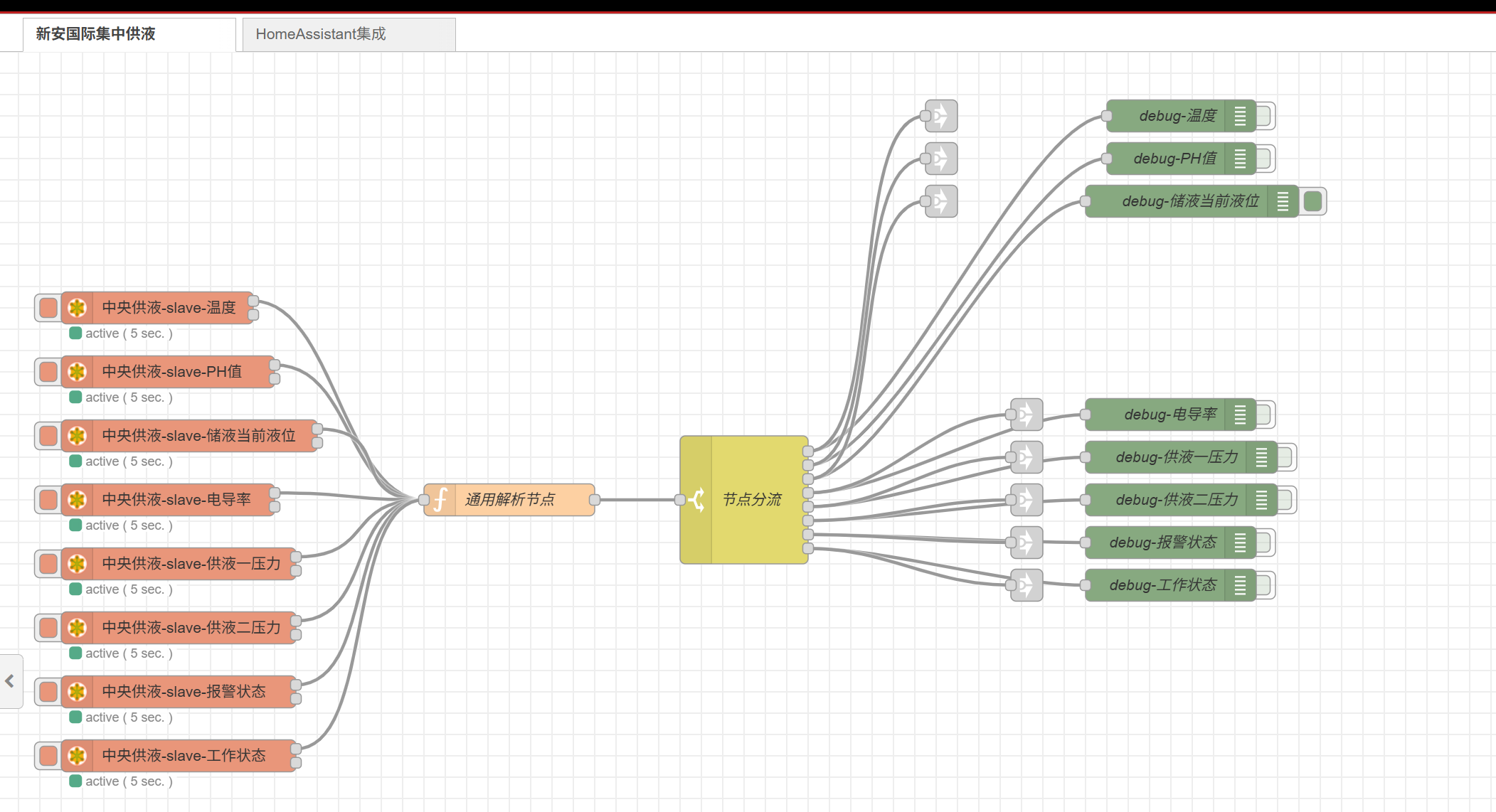 |
|---|
| | | |
|---|
| | | ### HomeAssistant集成- 工作流 |
|---|
| | | |
|---|
| | |  |
|---|
| New file |
| | |
|---|
| | | Rx:002810-00 7D 00 00 00 06 01 03 00 17 00 02 |
|---|
| | | Tx:002811-00 7D 00 00 00 07 01 03 04 CD CC 0C 42 |
|---|
| | | Rx:002812-00 7E 00 00 00 06 01 03 00 17 00 02 |
|---|
| | | Tx:002813-00 7E 00 00 00 07 01 03 04 CD CC 0C 42 |
|---|
| | | Rx:002814-00 7F 00 00 00 06 01 03 00 17 00 02 |
|---|
| | | Tx:002815-00 7F 00 00 00 07 01 03 04 CD CC 0C 42 |
|---|
| | | Rx:002816-00 80 00 00 00 06 01 03 00 17 00 02 |
|---|
| | | Tx:002817-00 80 00 00 00 07 01 03 04 CD CC 0C 42 |
|---|
| | | Rx:002818-00 81 00 00 00 06 01 03 00 17 00 02 |
|---|
| | | Tx:002819-00 81 00 00 00 07 01 03 04 CD CC 0C 42 |
|---|
| | | Rx:002820-00 82 00 00 00 06 01 03 00 17 00 02 |
|---|
| | | Tx:002821-00 82 00 00 00 07 01 03 04 CD CC 0C 42 |
|---|
| | | Rx:002822-00 83 00 00 00 06 01 03 00 17 00 02 |
|---|
| | | Tx:002823-00 83 00 00 00 07 01 03 04 CD CC 0C 42 |
|---|
| | | Rx:002824-00 84 00 00 00 06 01 03 00 17 00 02 |
|---|
| | | Tx:002825-00 84 00 00 00 07 01 03 04 CD CC 0C 42 |
|---|
| | | Rx:002826-00 85 00 00 00 06 01 03 00 17 00 02 |
|---|
| | | Tx:002827-00 85 00 00 00 07 01 03 04 CD CC 0C 42 |
|---|
| | | Rx:002828-00 86 00 00 00 06 01 03 00 17 00 02 |
|---|
| | | Tx:002829-00 86 00 00 00 07 01 03 04 CD CC 0C 42 |
|---|
| | | Rx:002830-00 87 00 00 00 06 01 03 00 17 00 02 |
|---|
| | | Tx:002831-00 87 00 00 00 07 01 03 04 CD CC 0C 42 |
|---|
| | | Rx:002832-00 88 00 00 00 06 01 03 00 17 00 02 |
|---|
| | | Tx:002833-00 88 00 00 00 07 01 03 04 CD CC 0C 42 |
|---|
| | | Rx:002834-00 89 00 00 00 06 01 03 00 17 00 02 |
|---|
| | | Tx:002835-00 89 00 00 00 07 01 03 04 CD CC 0C 42 |
|---|
| | | Rx:002836-00 8A 00 00 00 06 01 03 00 17 00 02 |
|---|
| | | Tx:002837-00 8A 00 00 00 07 01 03 04 CD CC 0C 42 |
|---|
| | | Rx:002838-00 8B 00 00 00 06 01 03 00 17 00 02 |
|---|
| | | Tx:002839-00 8B 00 00 00 07 01 03 04 CD CC 0C 42 |
|---|
| | | Rx:002840-00 8C 00 00 00 06 01 03 00 17 00 02 |
|---|
| | | Tx:002841-00 8C 00 00 00 07 01 03 04 CD CC 0C 42 |
|---|
| | | Rx:002842-00 8D 00 00 00 06 01 03 00 17 00 02 |
|---|
| | | Tx:002843-00 8D 00 00 00 07 01 03 04 CD CC 0C 42 |
|---|
| | | Rx:002844-00 8E 00 00 00 06 01 03 00 17 00 02 |
|---|
| | | Tx:002845-00 8E 00 00 00 07 01 03 04 CD CC 0C 42 |
|---|
| | | Rx:002846-00 8F 00 00 00 06 01 03 00 17 00 02 |
|---|
| | | Tx:002847-00 8F 00 00 00 07 01 03 04 CD CC 0C 42 |
|---|
| | | Rx:002848-00 90 00 00 00 06 01 03 00 17 00 02 |
|---|
| | | Tx:002849-00 90 00 00 00 07 01 03 04 CD CC 0C 42 |
|---|
| | | Rx:002850-00 91 00 00 00 06 01 03 00 17 00 02 |
|---|
| | | Tx:002851-00 91 00 00 00 07 01 03 04 CD CC 0C 42 |
|---|
| | | Rx:002852-00 92 00 00 00 06 01 03 00 17 00 02 |
|---|
| | | Tx:002853-00 92 00 00 00 07 01 03 04 CD CC 0C 42 |
|---|
| | | Rx:002854-00 93 00 00 00 06 01 03 00 17 00 02 |
|---|
| | | Tx:002855-00 93 00 00 00 07 01 03 04 CD CC 0C 42 |
|---|
| | | Rx:002856-00 94 00 00 00 06 01 03 00 17 00 02 |
|---|
| | | Tx:002857-00 94 00 00 00 07 01 03 04 CD CC 0C 42 |
|---|
| | | Rx:002858-00 95 00 00 00 06 01 03 00 17 00 02 |
|---|
| | | Tx:002859-00 95 00 00 00 07 01 03 04 CD CC 0C 42 |
|---|
| | | Rx:002860-00 96 00 00 00 06 01 03 00 17 00 02 |
|---|
| | | Tx:002861-00 96 00 00 00 07 01 03 04 CD CC 0C 42 |
|---|
| | | Rx:002862-00 97 00 00 00 06 01 03 00 17 00 02 |
|---|
| | | Tx:002863-00 97 00 00 00 07 01 03 04 CD CC 0C 42 |
|---|
| | | Rx:002864-00 98 00 00 00 06 01 03 00 17 00 02 |
|---|
| | | Tx:002865-00 98 00 00 00 07 01 03 04 CD CC 0C 42 |
|---|
| | | Rx:002866-00 99 00 00 00 06 01 03 00 17 00 02 |
|---|
| | | Tx:002867-00 99 00 00 00 07 01 03 04 CD CC 0C 42 |
|---|
| | | Rx:002868-00 9A 00 00 00 06 01 03 00 17 00 02 |
|---|
| | | Tx:002869-00 9A 00 00 00 07 01 03 04 CD CC 0C 42 |
|---|
| | | Rx:002870-00 9B 00 00 00 06 01 03 00 17 00 02 |
|---|
| | | Tx:002871-00 9B 00 00 00 07 01 03 04 CD CC 0C 42 |
|---|
| | | Rx:002872-00 9C 00 00 00 06 01 03 00 17 00 02 |
|---|
| | | Tx:002873-00 9C 00 00 00 07 01 03 04 CD CC 0C 42 |
|---|
| | | Rx:002874-00 9D 00 00 00 06 01 03 00 17 00 02 |
|---|
| | | Tx:002875-00 9D 00 00 00 07 01 03 04 CD CC 0C 42 |
|---|
| | | Rx:002876-00 9E 00 00 00 06 01 03 00 17 00 02 |
|---|
| | | Tx:002877-00 9E 00 00 00 07 01 03 04 CD CC 0C 42 |
|---|
| | | Rx:002878-00 9F 00 00 00 06 01 03 00 17 00 02 |
|---|
| | | Tx:002879-00 9F 00 00 00 07 01 03 04 CD CC 0C 42 |
|---|
| | | Rx:002880-00 A0 00 00 00 06 01 03 00 17 00 02 |
|---|
| | | Tx:002881-00 A0 00 00 00 07 01 03 04 CD CC 0C 42 |
|---|
| | | Rx:002882-00 A1 00 00 00 06 01 03 00 17 00 02 |
|---|
| | | Tx:002883-00 A1 00 00 00 07 01 03 04 CD CC 0C 42 |
|---|
| | | Rx:002884-00 A2 00 00 00 06 01 03 00 17 00 02 |
|---|
| | | Tx:002885-00 A2 00 00 00 07 01 03 04 CD CC 0C 42 |
|---|
| | | Rx:002886-00 A3 00 00 00 06 01 03 00 17 00 02 |
|---|
| | | Tx:002887-00 A3 00 00 00 07 01 03 04 CD CC 0C 42 |
|---|
| | | Rx:002888-00 A4 00 00 00 06 01 03 00 17 00 02 |
|---|
| | | Tx:002889-00 A4 00 00 00 07 01 03 04 CD CC 0C 42 |
|---|
| | | Rx:002890-00 A5 00 00 00 06 01 03 00 17 00 02 |
|---|
| | | Tx:002891-00 A5 00 00 00 07 01 03 04 CD CC 0C 42 |
|---|
| | | Rx:002892-00 A6 00 00 00 06 01 03 00 17 00 02 |
|---|
| | | Tx:002893-00 A6 00 00 00 07 01 03 04 CD CC 0C 42 |
|---|
| | | Rx:002894-00 A7 00 00 00 06 01 03 00 17 00 02 |
|---|
| | | Tx:002895-00 A7 00 00 00 07 01 03 04 CD CC 0C 42 |
|---|
| | | Rx:002896-00 A8 00 00 00 06 01 03 00 17 00 02 |
|---|
| | | Tx:002897-00 A8 00 00 00 07 01 03 04 CD CC 0C 42 |
|---|
| | | Rx:002898-00 A9 00 00 00 06 01 03 00 17 00 02 |
|---|
| | | Tx:002899-00 A9 00 00 00 07 01 03 04 CD CC 0C 42 |
|---|
| | | Rx:002900-00 AA 00 00 00 06 01 03 00 17 00 02 |
|---|
| | | Tx:002901-00 AA 00 00 00 07 01 03 04 CD CC 0C 42 |
|---|
| | | Rx:002902-00 AB 00 00 00 06 01 03 00 17 00 02 |
|---|
| | | Tx:002903-00 AB 00 00 00 07 01 03 04 CD CC 0C 42 |
|---|
| New file |
| | |
|---|
| | | [ |
|---|
| | | { |
|---|
| | | "id": "200c026180f22a70", |
|---|
| | | "type": "tab", |
|---|
| | | "label": "新安国际集中供液", |
|---|
| | | "disabled": false, |
|---|
| | | "info": "", |
|---|
| | | "env": [] |
|---|
| | | }, |
|---|
| | | { |
|---|
| | | "id": "ha_integration_tab", |
|---|
| | | "type": "tab", |
|---|
| | | "label": "HomeAssistant集成", |
|---|
| | | "disabled": false, |
|---|
| | | "info": "集中供液数据发送到HomeAssistant", |
|---|
| | | "env": [] |
|---|
| | | }, |
|---|
| | | { |
|---|
| | | "id": "086467396a2eed2c", |
|---|
| | | "type": "modbus-client", |
|---|
| | | "name": "modbus-slave-新安集中供液", |
|---|
| | | "clienttype": "tcp", |
|---|
| | | "bufferCommands": true, |
|---|
| | | "stateLogEnabled": false, |
|---|
| | | "queueLogEnabled": false, |
|---|
| | | "failureLogEnabled": true, |
|---|
| | | "tcpHost": "192.168.50.91", |
|---|
| | | "tcpPort": "5020", |
|---|
| | | "tcpType": "DEFAULT", |
|---|
| | | "serialPort": "/dev/ttyUSB", |
|---|
| | | "serialType": "RTU-BUFFERD", |
|---|
| | | "serialBaudrate": 9600, |
|---|
| | | "serialDatabits": 8, |
|---|
| | | "serialStopbits": 1, |
|---|
| | | "serialParity": "none", |
|---|
| | | "serialConnectionDelay": 100, |
|---|
| | | "serialAsciiResponseStartDelimiter": "0x3A", |
|---|
| | | "unit_id": 1, |
|---|
| | | "commandDelay": 1, |
|---|
| | | "clientTimeout": 1000, |
|---|
| | | "reconnectOnTimeout": true, |
|---|
| | | "reconnectTimeout": 2000, |
|---|
| | | "parallelUnitIdsAllowed": true, |
|---|
| | | "showErrors": false, |
|---|
| | | "showWarnings": true, |
|---|
| | | "showLogs": true |
|---|
| | | }, |
|---|
| | | { |
|---|
| | | "id": "mqtt_broker_ha", |
|---|
| | | "type": "mqtt-broker", |
|---|
| | | "name": "HomeAssistant MQTT", |
|---|
| | | "broker": "192.168.50.83", |
|---|
| | | "port": "1883", |
|---|
| | | "clientid": "nodered_central_liquid", |
|---|
| | | "autoConnect": true, |
|---|
| | | "usetls": false, |
|---|
| | | "protocolVersion": "4", |
|---|
| | | "keepalive": "60", |
|---|
| | | "cleansession": true, |
|---|
| | | "autoUnsubscribe": true, |
|---|
| | | "birthTopic": "homeassistant/status", |
|---|
| | | "birthQos": "0", |
|---|
| | | "birthPayload": "online", |
|---|
| | | "birthMsg": {}, |
|---|
| | | "closeTopic": "homeassistant/status", |
|---|
| | | "closeQos": "0", |
|---|
| | | "closePayload": "offline", |
|---|
| | | "closeMsg": {}, |
|---|
| | | "willTopic": "", |
|---|
| | | "willQos": "0", |
|---|
| | | "willPayload": "", |
|---|
| | | "willMsg": {}, |
|---|
| | | "userProps": "", |
|---|
| | | "sessionExpiry": "" |
|---|
| | | }, |
|---|
| | | { |
|---|
| | | "id": "72a90d52a45530d0", |
|---|
| | | "type": "function", |
|---|
| | | "z": "200c026180f22a70", |
|---|
| | | "name": "通用解析节点", |
|---|
| | | "func": "\nconst registers = msg.payload;\n// node.warn(`解析${registers}`);\n\n// 检查是否为状态数据(布尔类型或布尔数组)\nif (typeof registers === 'boolean' ||\n (Array.isArray(registers) && registers.length === 1 && typeof registers[0] === 'boolean') ||\n (Array.isArray(registers) && registers.length === 1 && typeof registers[0] === 'number' && (registers[0] === 0 || registers[0] === 1)) ||\n (Array.isArray(registers) && registers.length > 1 && typeof registers[0] === 'boolean')) {\n\n // 处理布尔状态数据\n let boolValue;\n if (typeof registers === 'boolean') {\n boolValue = registers;\n } else if (Array.isArray(registers) && registers.length === 1) {\n boolValue = typeof registers[0] === 'boolean' ? registers[0] : (registers[0] === 1);\n } else if (Array.isArray(registers) && registers.length > 1 && typeof registers[0] === 'boolean') {\n // 对于多个布尔值的数组,取第一个值作为主要状态\n boolValue = registers[0];\n // node.warn(`布尔数组长度: ${registers.length}, 取第一个值: ${boolValue}`);\n }\n\n // 根据 topic 确定状态类型\n let dataType = \"未知状态\";\n let statusValue = boolValue;\n\n if (msg.topic) {\n if (msg.topic.includes(\"工作状态\") || msg.topic.includes(\"work\") || msg.topic.includes(\"Q1.6\")) {\n dataType = \"工作状态\";\n statusValue = boolValue ? \"运行\" : \"停止\";\n msg.workStatus = statusValue;\n } else if (msg.topic.includes(\"报警状态\") || msg.topic.includes(\"alarm\") || msg.topic.includes(\"Q1.5\")) {\n dataType = \"报警状态\";\n statusValue = boolValue ? \"报警\" : \"正常\";\n msg.alarmStatus = statusValue;\n } else if (msg.topic.includes(\"状态\") || msg.topic.includes(\"status\")) {\n dataType = \"设备状态\";\n statusValue = boolValue ? \"激活\" : \"关闭\";\n msg.status = statusValue;\n }\n } else {\n // 如果没有 topic,使用通用状态字段\n msg.status = boolValue;\n dataType = \"状态\";\n }\n\n // 打印解析结果到调试控制台\n // node.warn(`解析${dataType} ---> ${statusValue}`);\n\n // 保留原始的 payload,添加解析后的值\n msg.originalPayload = msg.payload;\n msg.payload = statusValue;\n\n return msg;\n}\n\n// 检查寄存器长度(浮点数解析)\nif (!Array.isArray(registers) || registers.length !== 2) {\n node.warn(\"寄存器数量不足,无法解析浮点数!\");\n return null;\n}\n\n// 处理 Modbus 寄存器数据\n// 寄存器数据按 Big Endian 字序存储,但浮点数需要按 Little Endian 读取\nconst highRegister = registers[0]; // 高16位寄存器\nconst lowRegister = registers[1]; // 低16位寄存器\n\n// 创建一个 4 字节缓冲区\nconst buffer = Buffer.alloc(4);\n\n// 按照 Big Endian 方式写入寄存器数据\nbuffer.writeUInt16BE(highRegister, 0); // 写入高16位到前两个字节\nbuffer.writeUInt16BE(lowRegister, 2); // 写入低16位到后两个字节\n\n// 按照 Little Endian 方式读取 IEEE 754 浮点数\nconst rawValue = buffer.readFloatLE(0);\n\n// 保留两位小数\nconst value = Math.round(rawValue * 100) / 100;\n\n// 根据输入消息的 topic 或其他标识来确定数据类型\nlet dataType = \"未知数据\";\nif (msg.topic) {\n if (msg.topic.includes(\"温度\") || msg.topic.includes(\"temperature\")) {\n dataType = \"温度\";\n msg.temperature = value;\n } else if (msg.topic.includes(\"PH\") || msg.topic.includes(\"ph\")) {\n dataType = \"PH值\";\n msg.ph = value;\n } else if (msg.topic.includes(\"液位\") || msg.topic.includes(\"level\")) {\n dataType = \"液位\";\n msg.level = value;\n } else if (msg.topic.includes(\"电导率\") || msg.topic.includes(\"conductivity\")) {\n dataType = \"电导率\";\n msg.conductivity = value;\n } else if (msg.topic.includes(\"压力\") || msg.topic.includes(\"pressure\")) {\n dataType = \"压力\";\n msg.pressure = value;\n }\n} else {\n // 如果没有 topic,使用通用字段名\n msg.value = value;\n dataType = \"数值\";\n}\n\n// 打印解析结果到调试控制台\n// node.warn(`解析${dataType} ---> ${value}`);\n\n// 保留原始的 payload,添加解析后的值\nmsg.originalPayload = msg.payload;\nmsg.payload = value;\n\n// 返回 msg 对象,供后续节点使用\nreturn msg;\n", |
|---|
| | | "outputs": 1, |
|---|
| | | "timeout": 0, |
|---|
| | | "noerr": 0, |
|---|
| | | "initialize": "", |
|---|
| | | "finalize": "", |
|---|
| | | "libs": [], |
|---|
| | | "x": 480, |
|---|
| | | "y": 420, |
|---|
| | | "wires": [ |
|---|
| | | [ |
|---|
| | | "af0930278623437b" |
|---|
| | | ] |
|---|
| | | ] |
|---|
| | | }, |
|---|
| | | { |
|---|
| | | "id": "af0930278623437b", |
|---|
| | | "type": "switch", |
|---|
| | | "z": "200c026180f22a70", |
|---|
| | | "name": "节点分流", |
|---|
| | | "property": "topic", |
|---|
| | | "propertyType": "msg", |
|---|
| | | "rules": [ |
|---|
| | | { |
|---|
| | | "t": "cont", |
|---|
| | | "v": "温度", |
|---|
| | | "vt": "str" |
|---|
| | | }, |
|---|
| | | { |
|---|
| | | "t": "cont", |
|---|
| | | "v": "PH", |
|---|
| | | "vt": "str" |
|---|
| | | }, |
|---|
| | | { |
|---|
| | | "t": "cont", |
|---|
| | | "v": "储液当前液位", |
|---|
| | | "vt": "str" |
|---|
| | | }, |
|---|
| | | { |
|---|
| | | "t": "cont", |
|---|
| | | "v": "电导率", |
|---|
| | | "vt": "str" |
|---|
| | | }, |
|---|
| | | { |
|---|
| | | "t": "cont", |
|---|
| | | "v": "供液一压力", |
|---|
| | | "vt": "str" |
|---|
| | | }, |
|---|
| | | { |
|---|
| | | "t": "cont", |
|---|
| | | "v": "供液二压力", |
|---|
| | | "vt": "str" |
|---|
| | | }, |
|---|
| | | { |
|---|
| | | "t": "cont", |
|---|
| | | "v": "报警状态", |
|---|
| | | "vt": "str" |
|---|
| | | }, |
|---|
| | | { |
|---|
| | | "t": "cont", |
|---|
| | | "v": "工作状态", |
|---|
| | | "vt": "str" |
|---|
| | | } |
|---|
| | | ], |
|---|
| | | "checkall": "true", |
|---|
| | | "repair": false, |
|---|
| | | "outputs": 8, |
|---|
| | | "x": 700, |
|---|
| | | "y": 420, |
|---|
| | | "wires": [ |
|---|
| | | [ |
|---|
| | | "fa5417377a61b71e", |
|---|
| | | "link_temperature_out" |
|---|
| | | ], |
|---|
| | | [ |
|---|
| | | "1490bcab1bec54c1", |
|---|
| | | "link_ph_out" |
|---|
| | | ], |
|---|
| | | [ |
|---|
| | | "84475a694e701126", |
|---|
| | | "link_level_out" |
|---|
| | | ], |
|---|
| | | [ |
|---|
| | | "7c6dae0c8ca8c7aa", |
|---|
| | | "link_conductivity_out" |
|---|
| | | ], |
|---|
| | | [ |
|---|
| | | "095d8a5fee72b512", |
|---|
| | | "link_pressure1_out" |
|---|
| | | ], |
|---|
| | | [ |
|---|
| | | "f82ed17f4277b2e2", |
|---|
| | | "link_pressure2_out" |
|---|
| | | ], |
|---|
| | | [ |
|---|
| | | "aff2063ee6398034", |
|---|
| | | "link_alarm_out" |
|---|
| | | ], |
|---|
| | | [ |
|---|
| | | "c44e177352a6f455", |
|---|
| | | "link_work_status_out" |
|---|
| | | ] |
|---|
| | | ] |
|---|
| | | }, |
|---|
| | | { |
|---|
| | | "id": "7bec428b86e8c8bc", |
|---|
| | | "type": "modbus-read", |
|---|
| | | "z": "200c026180f22a70", |
|---|
| | | "name": "中央供液-slave-温度", |
|---|
| | | "topic": "温度", |
|---|
| | | "showStatusActivities": true, |
|---|
| | | "logIOActivities": false, |
|---|
| | | "showErrors": true, |
|---|
| | | "showWarnings": true, |
|---|
| | | "unitid": "1", |
|---|
| | | "dataType": "HoldingRegister", |
|---|
| | | "adr": "23", |
|---|
| | | "quantity": "2", |
|---|
| | | "rate": "5", |
|---|
| | | "rateUnit": "s", |
|---|
| | | "delayOnStart": false, |
|---|
| | | "startDelayTime": "", |
|---|
| | | "server": "086467396a2eed2c", |
|---|
| | | "useIOFile": false, |
|---|
| | | "ioFile": "", |
|---|
| | | "useIOForPayload": false, |
|---|
| | | "emptyMsgOnFail": true, |
|---|
| | | "x": 150, |
|---|
| | | "y": 240, |
|---|
| | | "wires": [ |
|---|
| | | [ |
|---|
| | | "72a90d52a45530d0" |
|---|
| | | ], |
|---|
| | | [] |
|---|
| | | ] |
|---|
| | | }, |
|---|
| | | { |
|---|
| | | "id": "fa5417377a61b71e", |
|---|
| | | "type": "debug", |
|---|
| | | "z": "200c026180f22a70", |
|---|
| | | "name": "debug-温度", |
|---|
| | | "active": false, |
|---|
| | | "tosidebar": true, |
|---|
| | | "console": false, |
|---|
| | | "tostatus": false, |
|---|
| | | "complete": "payload", |
|---|
| | | "targetType": "msg", |
|---|
| | | "statusVal": "", |
|---|
| | | "statusType": "auto", |
|---|
| | | "x": 1110, |
|---|
| | | "y": 60, |
|---|
| | | "wires": [] |
|---|
| | | }, |
|---|
| | | { |
|---|
| | | "id": "fb1f1d999f707aa2", |
|---|
| | | "type": "modbus-read", |
|---|
| | | "z": "200c026180f22a70", |
|---|
| | | "name": "中央供液-slave-PH值", |
|---|
| | | "topic": "PH值", |
|---|
| | | "showStatusActivities": true, |
|---|
| | | "logIOActivities": false, |
|---|
| | | "showErrors": true, |
|---|
| | | "showWarnings": true, |
|---|
| | | "unitid": "1", |
|---|
| | | "dataType": "HoldingRegister", |
|---|
| | | "adr": "160", |
|---|
| | | "quantity": "2", |
|---|
| | | "rate": "5", |
|---|
| | | "rateUnit": "s", |
|---|
| | | "delayOnStart": false, |
|---|
| | | "startDelayTime": "", |
|---|
| | | "server": "086467396a2eed2c", |
|---|
| | | "useIOFile": false, |
|---|
| | | "ioFile": "", |
|---|
| | | "useIOForPayload": false, |
|---|
| | | "emptyMsgOnFail": true, |
|---|
| | | "x": 160, |
|---|
| | | "y": 300, |
|---|
| | | "wires": [ |
|---|
| | | [ |
|---|
| | | "72a90d52a45530d0" |
|---|
| | | ], |
|---|
| | | [] |
|---|
| | | ] |
|---|
| | | }, |
|---|
| | | { |
|---|
| | | "id": "1490bcab1bec54c1", |
|---|
| | | "type": "debug", |
|---|
| | | "z": "200c026180f22a70", |
|---|
| | | "name": "debug-PH值", |
|---|
| | | "active": false, |
|---|
| | | "tosidebar": true, |
|---|
| | | "console": false, |
|---|
| | | "tostatus": false, |
|---|
| | | "complete": "payload", |
|---|
| | | "targetType": "msg", |
|---|
| | | "statusVal": "", |
|---|
| | | "statusType": "auto", |
|---|
| | | "x": 1110, |
|---|
| | | "y": 100, |
|---|
| | | "wires": [] |
|---|
| | | }, |
|---|
| | | { |
|---|
| | | "id": "bb17984ec96509da", |
|---|
| | | "type": "modbus-read", |
|---|
| | | "z": "200c026180f22a70", |
|---|
| | | "name": "中央供液-slave-储液当前液位", |
|---|
| | | "topic": "储液当前液位", |
|---|
| | | "showStatusActivities": true, |
|---|
| | | "logIOActivities": false, |
|---|
| | | "showErrors": true, |
|---|
| | | "showWarnings": true, |
|---|
| | | "unitid": "1", |
|---|
| | | "dataType": "HoldingRegister", |
|---|
| | | "adr": "128", |
|---|
| | | "quantity": "2", |
|---|
| | | "rate": "5", |
|---|
| | | "rateUnit": "s", |
|---|
| | | "delayOnStart": false, |
|---|
| | | "startDelayTime": "", |
|---|
| | | "server": "086467396a2eed2c", |
|---|
| | | "useIOFile": false, |
|---|
| | | "ioFile": "", |
|---|
| | | "useIOForPayload": false, |
|---|
| | | "emptyMsgOnFail": true, |
|---|
| | | "x": 180, |
|---|
| | | "y": 360, |
|---|
| | | "wires": [ |
|---|
| | | [ |
|---|
| | | "72a90d52a45530d0" |
|---|
| | | ], |
|---|
| | | [] |
|---|
| | | ] |
|---|
| | | }, |
|---|
| | | { |
|---|
| | | "id": "84475a694e701126", |
|---|
| | | "type": "debug", |
|---|
| | | "z": "200c026180f22a70", |
|---|
| | | "name": "debug-储液当前液位", |
|---|
| | | "active": true, |
|---|
| | | "tosidebar": true, |
|---|
| | | "console": false, |
|---|
| | | "tostatus": false, |
|---|
| | | "complete": "payload", |
|---|
| | | "targetType": "msg", |
|---|
| | | "statusVal": "", |
|---|
| | | "statusType": "auto", |
|---|
| | | "x": 1120, |
|---|
| | | "y": 140, |
|---|
| | | "wires": [] |
|---|
| | | }, |
|---|
| | | { |
|---|
| | | "id": "805bb39037771c2d", |
|---|
| | | "type": "modbus-read", |
|---|
| | | "z": "200c026180f22a70", |
|---|
| | | "name": "中央供液-slave-电导率", |
|---|
| | | "topic": "电导率", |
|---|
| | | "showStatusActivities": true, |
|---|
| | | "logIOActivities": false, |
|---|
| | | "showErrors": true, |
|---|
| | | "showWarnings": true, |
|---|
| | | "unitid": "1", |
|---|
| | | "dataType": "HoldingRegister", |
|---|
| | | "adr": "84", |
|---|
| | | "quantity": "2", |
|---|
| | | "rate": "5", |
|---|
| | | "rateUnit": "s", |
|---|
| | | "delayOnStart": false, |
|---|
| | | "startDelayTime": "", |
|---|
| | | "server": "086467396a2eed2c", |
|---|
| | | "useIOFile": false, |
|---|
| | | "ioFile": "", |
|---|
| | | "useIOForPayload": false, |
|---|
| | | "emptyMsgOnFail": true, |
|---|
| | | "x": 160, |
|---|
| | | "y": 420, |
|---|
| | | "wires": [ |
|---|
| | | [ |
|---|
| | | "72a90d52a45530d0" |
|---|
| | | ], |
|---|
| | | [] |
|---|
| | | ] |
|---|
| | | }, |
|---|
| | | { |
|---|
| | | "id": "7c6dae0c8ca8c7aa", |
|---|
| | | "type": "debug", |
|---|
| | | "z": "200c026180f22a70", |
|---|
| | | "name": "debug-电导率", |
|---|
| | | "active": false, |
|---|
| | | "tosidebar": true, |
|---|
| | | "console": false, |
|---|
| | | "tostatus": false, |
|---|
| | | "complete": "payload", |
|---|
| | | "targetType": "msg", |
|---|
| | | "statusVal": "", |
|---|
| | | "statusType": "auto", |
|---|
| | | "x": 1100, |
|---|
| | | "y": 340, |
|---|
| | | "wires": [] |
|---|
| | | }, |
|---|
| | | { |
|---|
| | | "id": "56e20ad9b8718468", |
|---|
| | | "type": "modbus-read", |
|---|
| | | "z": "200c026180f22a70", |
|---|
| | | "name": "中央供液-slave-供液一压力", |
|---|
| | | "topic": "供液一压力", |
|---|
| | | "showStatusActivities": true, |
|---|
| | | "logIOActivities": false, |
|---|
| | | "showErrors": true, |
|---|
| | | "showWarnings": true, |
|---|
| | | "unitid": "1", |
|---|
| | | "dataType": "HoldingRegister", |
|---|
| | | "adr": "112", |
|---|
| | | "quantity": "2", |
|---|
| | | "rate": "5", |
|---|
| | | "rateUnit": "s", |
|---|
| | | "delayOnStart": false, |
|---|
| | | "startDelayTime": "", |
|---|
| | | "server": "086467396a2eed2c", |
|---|
| | | "useIOFile": false, |
|---|
| | | "ioFile": "", |
|---|
| | | "useIOForPayload": false, |
|---|
| | | "emptyMsgOnFail": true, |
|---|
| | | "x": 170, |
|---|
| | | "y": 480, |
|---|
| | | "wires": [ |
|---|
| | | [ |
|---|
| | | "72a90d52a45530d0" |
|---|
| | | ], |
|---|
| | | [] |
|---|
| | | ] |
|---|
| | | }, |
|---|
| | | { |
|---|
| | | "id": "095d8a5fee72b512", |
|---|
| | | "type": "debug", |
|---|
| | | "z": "200c026180f22a70", |
|---|
| | | "name": "debug-供液一压力", |
|---|
| | | "active": false, |
|---|
| | | "tosidebar": true, |
|---|
| | | "console": false, |
|---|
| | | "tostatus": false, |
|---|
| | | "complete": "payload", |
|---|
| | | "targetType": "msg", |
|---|
| | | "statusVal": "", |
|---|
| | | "statusType": "auto", |
|---|
| | | "x": 1110, |
|---|
| | | "y": 380, |
|---|
| | | "wires": [] |
|---|
| | | }, |
|---|
| | | { |
|---|
| | | "id": "2923878ddaa66ef8", |
|---|
| | | "type": "modbus-read", |
|---|
| | | "z": "200c026180f22a70", |
|---|
| | | "name": "中央供液-slave-供液二压力", |
|---|
| | | "topic": "供液二压力", |
|---|
| | | "showStatusActivities": true, |
|---|
| | | "logIOActivities": false, |
|---|
| | | "showErrors": true, |
|---|
| | | "showWarnings": true, |
|---|
| | | "unitid": "1", |
|---|
| | | "dataType": "HoldingRegister", |
|---|
| | | "adr": "116", |
|---|
| | | "quantity": "2", |
|---|
| | | "rate": "5", |
|---|
| | | "rateUnit": "s", |
|---|
| | | "delayOnStart": false, |
|---|
| | | "startDelayTime": "", |
|---|
| | | "server": "086467396a2eed2c", |
|---|
| | | "useIOFile": false, |
|---|
| | | "ioFile": "", |
|---|
| | | "useIOForPayload": false, |
|---|
| | | "emptyMsgOnFail": true, |
|---|
| | | "x": 170, |
|---|
| | | "y": 540, |
|---|
| | | "wires": [ |
|---|
| | | [ |
|---|
| | | "72a90d52a45530d0" |
|---|
| | | ], |
|---|
| | | [] |
|---|
| | | ] |
|---|
| | | }, |
|---|
| | | { |
|---|
| | | "id": "f82ed17f4277b2e2", |
|---|
| | | "type": "debug", |
|---|
| | | "z": "200c026180f22a70", |
|---|
| | | "name": "debug-供液二压力", |
|---|
| | | "active": false, |
|---|
| | | "tosidebar": true, |
|---|
| | | "console": false, |
|---|
| | | "tostatus": false, |
|---|
| | | "complete": "payload", |
|---|
| | | "targetType": "msg", |
|---|
| | | "statusVal": "", |
|---|
| | | "statusType": "auto", |
|---|
| | | "x": 1110, |
|---|
| | | "y": 420, |
|---|
| | | "wires": [] |
|---|
| | | }, |
|---|
| | | { |
|---|
| | | "id": "fe307fc992aa444d", |
|---|
| | | "type": "modbus-read", |
|---|
| | | "z": "200c026180f22a70", |
|---|
| | | "name": "中央供液-slave-报警状态", |
|---|
| | | "topic": "报警状态", |
|---|
| | | "showStatusActivities": true, |
|---|
| | | "logIOActivities": false, |
|---|
| | | "showErrors": true, |
|---|
| | | "showWarnings": true, |
|---|
| | | "unitid": "1", |
|---|
| | | "dataType": "Coil", |
|---|
| | | "adr": "13", |
|---|
| | | "quantity": "1", |
|---|
| | | "rate": "5", |
|---|
| | | "rateUnit": "s", |
|---|
| | | "delayOnStart": false, |
|---|
| | | "startDelayTime": "", |
|---|
| | | "server": "086467396a2eed2c", |
|---|
| | | "useIOFile": false, |
|---|
| | | "ioFile": "", |
|---|
| | | "useIOForPayload": false, |
|---|
| | | "emptyMsgOnFail": true, |
|---|
| | | "x": 170, |
|---|
| | | "y": 600, |
|---|
| | | "wires": [ |
|---|
| | | [ |
|---|
| | | "72a90d52a45530d0" |
|---|
| | | ], |
|---|
| | | [] |
|---|
| | | ] |
|---|
| | | }, |
|---|
| | | { |
|---|
| | | "id": "aff2063ee6398034", |
|---|
| | | "type": "debug", |
|---|
| | | "z": "200c026180f22a70", |
|---|
| | | "name": "debug-报警状态", |
|---|
| | | "active": false, |
|---|
| | | "tosidebar": true, |
|---|
| | | "console": false, |
|---|
| | | "tostatus": false, |
|---|
| | | "complete": "payload", |
|---|
| | | "targetType": "msg", |
|---|
| | | "statusVal": "", |
|---|
| | | "statusType": "auto", |
|---|
| | | "x": 1100, |
|---|
| | | "y": 460, |
|---|
| | | "wires": [] |
|---|
| | | }, |
|---|
| | | { |
|---|
| | | "id": "5ab73337424b189a", |
|---|
| | | "type": "modbus-read", |
|---|
| | | "z": "200c026180f22a70", |
|---|
| | | "name": "中央供液-slave-工作状态", |
|---|
| | | "topic": "工作状态", |
|---|
| | | "showStatusActivities": true, |
|---|
| | | "logIOActivities": false, |
|---|
| | | "showErrors": true, |
|---|
| | | "showWarnings": true, |
|---|
| | | "unitid": "1", |
|---|
| | | "dataType": "Coil", |
|---|
| | | "adr": "14", |
|---|
| | | "quantity": "1", |
|---|
| | | "rate": "5", |
|---|
| | | "rateUnit": "s", |
|---|
| | | "delayOnStart": false, |
|---|
| | | "startDelayTime": "", |
|---|
| | | "server": "086467396a2eed2c", |
|---|
| | | "useIOFile": false, |
|---|
| | | "ioFile": "", |
|---|
| | | "useIOForPayload": false, |
|---|
| | | "emptyMsgOnFail": true, |
|---|
| | | "x": 170, |
|---|
| | | "y": 660, |
|---|
| | | "wires": [ |
|---|
| | | [ |
|---|
| | | "72a90d52a45530d0" |
|---|
| | | ], |
|---|
| | | [] |
|---|
| | | ] |
|---|
| | | }, |
|---|
| | | { |
|---|
| | | "id": "c44e177352a6f455", |
|---|
| | | "type": "debug", |
|---|
| | | "z": "200c026180f22a70", |
|---|
| | | "name": "debug-工作状态", |
|---|
| | | "active": false, |
|---|
| | | "tosidebar": true, |
|---|
| | | "console": false, |
|---|
| | | "tostatus": false, |
|---|
| | | "complete": "payload", |
|---|
| | | "targetType": "msg", |
|---|
| | | "statusVal": "", |
|---|
| | | "statusType": "auto", |
|---|
| | | "x": 1100, |
|---|
| | | "y": 500, |
|---|
| | | "wires": [] |
|---|
| | | }, |
|---|
| | | { |
|---|
| | | "id": "link_temperature_out", |
|---|
| | | "type": "link out", |
|---|
| | | "z": "200c026180f22a70", |
|---|
| | | "name": "发送温度到HA", |
|---|
| | | "mode": "link", |
|---|
| | | "links": [ |
|---|
| | | "link_ha_temperature_in" |
|---|
| | | ], |
|---|
| | | "x": 885, |
|---|
| | | "y": 60, |
|---|
| | | "wires": [] |
|---|
| | | }, |
|---|
| | | { |
|---|
| | | "id": "link_ph_out", |
|---|
| | | "type": "link out", |
|---|
| | | "z": "200c026180f22a70", |
|---|
| | | "name": "发送PH值到HA", |
|---|
| | | "mode": "link", |
|---|
| | | "links": [ |
|---|
| | | "link_ha_ph_in" |
|---|
| | | ], |
|---|
| | | "x": 885, |
|---|
| | | "y": 100, |
|---|
| | | "wires": [] |
|---|
| | | }, |
|---|
| | | { |
|---|
| | | "id": "link_level_out", |
|---|
| | | "type": "link out", |
|---|
| | | "z": "200c026180f22a70", |
|---|
| | | "name": "发送液位到HA", |
|---|
| | | "mode": "link", |
|---|
| | | "links": [ |
|---|
| | | "link_ha_level_in" |
|---|
| | | ], |
|---|
| | | "x": 885, |
|---|
| | | "y": 140, |
|---|
| | | "wires": [] |
|---|
| | | }, |
|---|
| | | { |
|---|
| | | "id": "link_conductivity_out", |
|---|
| | | "type": "link out", |
|---|
| | | "z": "200c026180f22a70", |
|---|
| | | "name": "发送电导率到HA", |
|---|
| | | "mode": "link", |
|---|
| | | "links": [ |
|---|
| | | "link_ha_conductivity_in" |
|---|
| | | ], |
|---|
| | | "x": 965, |
|---|
| | | "y": 340, |
|---|
| | | "wires": [] |
|---|
| | | }, |
|---|
| | | { |
|---|
| | | "id": "link_pressure1_out", |
|---|
| | | "type": "link out", |
|---|
| | | "z": "200c026180f22a70", |
|---|
| | | "name": "发送供液一压力到HA", |
|---|
| | | "mode": "link", |
|---|
| | | "links": [ |
|---|
| | | "link_ha_pressure1_in" |
|---|
| | | ], |
|---|
| | | "x": 965, |
|---|
| | | "y": 380, |
|---|
| | | "wires": [] |
|---|
| | | }, |
|---|
| | | { |
|---|
| | | "id": "link_pressure2_out", |
|---|
| | | "type": "link out", |
|---|
| | | "z": "200c026180f22a70", |
|---|
| | | "name": "发送供液二压力到HA", |
|---|
| | | "mode": "link", |
|---|
| | | "links": [ |
|---|
| | | "link_ha_pressure2_in" |
|---|
| | | ], |
|---|
| | | "x": 965, |
|---|
| | | "y": 420, |
|---|
| | | "wires": [] |
|---|
| | | }, |
|---|
| | | { |
|---|
| | | "id": "link_alarm_out", |
|---|
| | | "type": "link out", |
|---|
| | | "z": "200c026180f22a70", |
|---|
| | | "name": "发送报警状态到HA", |
|---|
| | | "mode": "link", |
|---|
| | | "links": [ |
|---|
| | | "link_ha_alarm_in" |
|---|
| | | ], |
|---|
| | | "x": 965, |
|---|
| | | "y": 460, |
|---|
| | | "wires": [] |
|---|
| | | }, |
|---|
| | | { |
|---|
| | | "id": "link_work_status_out", |
|---|
| | | "type": "link out", |
|---|
| | | "z": "200c026180f22a70", |
|---|
| | | "name": "发送工作状态到HA", |
|---|
| | | "mode": "link", |
|---|
| | | "links": [ |
|---|
| | | "link_ha_work_in" |
|---|
| | | ], |
|---|
| | | "x": 965, |
|---|
| | | "y": 500, |
|---|
| | | "wires": [] |
|---|
| | | }, |
|---|
| | | { |
|---|
| | | "id": "ha_discovery_function", |
|---|
| | | "type": "function", |
|---|
| | | "z": "ha_integration_tab", |
|---|
| | | "name": "HomeAssistant自动发现配置", |
|---|
| | | "func": "// HomeAssistant MQTT 自动发现配置 - 无分割版本\n// 每个传感器单独发送,避免分割节点问题\n\nconst deviceId = \"central_liquid_supply\";\nconst deviceName = \"新安国际集中供液系统\";\nconst baseTopic = \"homeassistant\";\n\n// 设备基本信息\nconst device = {\n identifiers: [deviceId],\n name: deviceName,\n manufacturer: \"新安国际\",\n model: \"集中供液系统\",\n sw_version: \"1.0\"\n};\n\n// 所有传感器配置\nconst allSensors = [\n { type: \"sensor\", name: \"温度\", entity_id: \"temperature\", unit: \"°C\", device_class: \"temperature\" },\n { type: \"sensor\", name: \"PH值\", entity_id: \"ph_value\", unit: \"pH\" },\n { type: \"sensor\", name: \"电导率\", entity_id: \"conductivity\", unit: \"μS/cm\" },\n { type: \"sensor\", name: \"储液当前液位\", entity_id: \"storage_level\", unit: \"L\" },\n { type: \"sensor\", name: \"供液一压力\", entity_id: \"supply_pressure_1\", unit: \"kPa\", device_class: \"pressure\" },\n { type: \"sensor\", name: \"供液二压力\", entity_id: \"supply_pressure_2\", unit: \"kPa\", device_class: \"pressure\" },\n { type: \"binary_sensor\", name: \"工作状态\", entity_id: \"work_status\", device_class: \"running\" },\n { type: \"binary_sensor\", name: \"报警状态\", entity_id: \"alarm_status\", device_class: \"problem\" }\n];\n\nnode.warn(`开始处理 ${allSensors.length} 个传感器配置`);\n\n// 逐个发送传感器配置\nallSensors.forEach((sensor, index) => {\n const config = {\n name: sensor.name,\n unique_id: `${deviceId}_${sensor.entity_id}`,\n state_topic: `${deviceId}/${sensor.type}/${sensor.entity_id}/state`,\n device: device\n };\n\n // 根据传感器类型添加特定配置\n if (sensor.type === \"sensor\") {\n config.state_class = \"measurement\";\n if (sensor.unit) config.unit_of_measurement = sensor.unit;\n if (sensor.device_class) config.device_class = sensor.device_class;\n } else if (sensor.type === \"binary_sensor\") {\n config.device_class = sensor.device_class;\n config.payload_on = sensor.entity_id === \"work_status\" ? \"运行\" : \"报警\";\n config.payload_off = sensor.entity_id === \"work_status\" ? \"停止\" : \"正常\";\n }\n\n const mqttTopic = `${baseTopic}/${sensor.type}/${deviceId}_${sensor.entity_id}/config`;\n const mqttPayload = JSON.stringify(config);\n\n node.warn(`发送配置 ${index + 1}/${allSensors.length}: ${sensor.name}`);\n node.warn(` 主题: ${mqttTopic}`);\n\n // 立即发送MQTT消息\n node.send({\n topic: mqttTopic,\n payload: mqttPayload,\n retain: true\n });\n\n // 添加小延迟,确保消息按顺序发送\n setTimeout(() => {\n if (index === allSensors.length - 1) {\n // 最后发送设备状态\n node.send({\n topic: `${deviceId}/status`,\n payload: \"online\",\n retain: true\n });\n node.warn(\"所有自动发现配置已发送完成\");\n }\n }, index * 100);\n});\n\nreturn null; // 不通过return发送,直接通过node.send发送\n", |
|---|
| | | "outputs": 1, |
|---|
| | | "timeout": 0, |
|---|
| | | "noerr": 0, |
|---|
| | | "initialize": "", |
|---|
| | | "finalize": "", |
|---|
| | | "libs": [], |
|---|
| | | "x": 240, |
|---|
| | | "y": 140, |
|---|
| | | "wires": [ |
|---|
| | | [ |
|---|
| | | "25565ecbf48f0308", |
|---|
| | | "ha_discovery_mqtt" |
|---|
| | | ] |
|---|
| | | ] |
|---|
| | | }, |
|---|
| | | { |
|---|
| | | "id": "ha_discovery_mqtt", |
|---|
| | | "type": "mqtt out", |
|---|
| | | "z": "ha_integration_tab", |
|---|
| | | "name": "发送自动发现配置", |
|---|
| | | "topic": "", |
|---|
| | | "qos": "0", |
|---|
| | | "retain": "true", |
|---|
| | | "respTopic": "", |
|---|
| | | "contentType": "", |
|---|
| | | "userProps": "", |
|---|
| | | "correl": "", |
|---|
| | | "expiry": "", |
|---|
| | | "broker": "mqtt_broker_ha", |
|---|
| | | "x": 610, |
|---|
| | | "y": 120, |
|---|
| | | "wires": [] |
|---|
| | | }, |
|---|
| | | { |
|---|
| | | "id": "ha_discovery_trigger", |
|---|
| | | "type": "inject", |
|---|
| | | "z": "ha_integration_tab", |
|---|
| | | "name": "启动自动发现", |
|---|
| | | "props": [ |
|---|
| | | { |
|---|
| | | "p": "payload" |
|---|
| | | }, |
|---|
| | | { |
|---|
| | | "p": "topic", |
|---|
| | | "vt": "str" |
|---|
| | | } |
|---|
| | | ], |
|---|
| | | "repeat": "", |
|---|
| | | "crontab": "", |
|---|
| | | "once": true, |
|---|
| | | "onceDelay": "5", |
|---|
| | | "topic": "", |
|---|
| | | "payload": "", |
|---|
| | | "payloadType": "date", |
|---|
| | | "x": 120, |
|---|
| | | "y": 80, |
|---|
| | | "wires": [ |
|---|
| | | [ |
|---|
| | | "ha_discovery_function" |
|---|
| | | ] |
|---|
| | | ] |
|---|
| | | }, |
|---|
| | | { |
|---|
| | | "id": "ha_data_processor", |
|---|
| | | "type": "function", |
|---|
| | | "z": "ha_integration_tab", |
|---|
| | | "name": "数据处理器", |
|---|
| | | "func": "// 处理来自集中供液系统的数据\nconst deviceId = \"central_liquid_supply\";\nconst topic = msg.topic;\nconst value = msg.payload;\n\n// 根据 topic 确定实体类型和 ID\nlet entityType = \"sensor\";\nlet entityId = \"\";\nlet stateTopic = \"\";\n\nif (topic.includes(\"温度\")) {\n entityId = \"temperature\";\n stateTopic = `${deviceId}/sensor/${entityId}/state`;\n} else if (topic.includes(\"PH\")) {\n entityId = \"ph_value\";\n stateTopic = `${deviceId}/sensor/${entityId}/state`;\n} else if (topic.includes(\"电导率\")) {\n entityId = \"conductivity\";\n stateTopic = `${deviceId}/sensor/${entityId}/state`;\n} else if (topic.includes(\"配液当前液位\")) {\n entityId = \"mixing_level\";\n stateTopic = `${deviceId}/sensor/${entityId}/state`;\n} else if (topic.includes(\"储液当前液位\")) {\n entityId = \"storage_level\";\n stateTopic = `${deviceId}/sensor/${entityId}/state`;\n} else if (topic.includes(\"供液一压力\")) {\n entityId = \"supply_pressure_1\";\n stateTopic = `${deviceId}/sensor/${entityId}/state`;\n} else if (topic.includes(\"供液二压力\")) {\n entityId = \"supply_pressure_2\";\n stateTopic = `${deviceId}/sensor/${entityId}/state`;\n} else if (topic.includes(\"工作状态\")) {\n entityType = \"binary_sensor\";\n entityId = \"work_status\";\n stateTopic = `${deviceId}/binary_sensor/${entityId}/state`;\n} else if (topic.includes(\"报警状态\")) {\n entityType = \"binary_sensor\";\n entityId = \"alarm_status\";\n stateTopic = `${deviceId}/binary_sensor/${entityId}/state`;\n} else {\n node.warn(`未知的数据类型: ${topic}`);\n return null;\n}\n\n// 记录数据处理信息\nnode.warn(`处理数据: ${topic} = ${value} -> ${stateTopic}`);\n\n// 创建输出消息\nconst outputMsg = {\n topic: stateTopic,\n payload: String(value),\n retain: false\n};\n\nreturn outputMsg;", |
|---|
| | | "outputs": 1, |
|---|
| | | "timeout": 0, |
|---|
| | | "noerr": 0, |
|---|
| | | "initialize": "", |
|---|
| | | "finalize": "", |
|---|
| | | "libs": [], |
|---|
| | | "x": 300, |
|---|
| | | "y": 300, |
|---|
| | | "wires": [ |
|---|
| | | [ |
|---|
| | | "ha_data_mqtt", |
|---|
| | | "ha_data_debug" |
|---|
| | | ] |
|---|
| | | ] |
|---|
| | | }, |
|---|
| | | { |
|---|
| | | "id": "ha_data_mqtt", |
|---|
| | | "type": "mqtt out", |
|---|
| | | "z": "ha_integration_tab", |
|---|
| | | "name": "发送数据到HA", |
|---|
| | | "topic": "", |
|---|
| | | "qos": "0", |
|---|
| | | "retain": "false", |
|---|
| | | "respTopic": "", |
|---|
| | | "contentType": "", |
|---|
| | | "userProps": "", |
|---|
| | | "correl": "", |
|---|
| | | "expiry": "", |
|---|
| | | "broker": "mqtt_broker_ha", |
|---|
| | | "x": 540, |
|---|
| | | "y": 300, |
|---|
| | | "wires": [] |
|---|
| | | }, |
|---|
| | | { |
|---|
| | | "id": "ha_data_debug", |
|---|
| | | "type": "debug", |
|---|
| | | "z": "ha_integration_tab", |
|---|
| | | "name": "HA数据调试", |
|---|
| | | "active": false, |
|---|
| | | "tosidebar": true, |
|---|
| | | "console": false, |
|---|
| | | "tostatus": false, |
|---|
| | | "complete": "true", |
|---|
| | | "targetType": "full", |
|---|
| | | "statusVal": "", |
|---|
| | | "statusType": "auto", |
|---|
| | | "x": 550, |
|---|
| | | "y": 400, |
|---|
| | | "wires": [] |
|---|
| | | }, |
|---|
| | | { |
|---|
| | | "id": "link_ha_temperature_in", |
|---|
| | | "type": "link in", |
|---|
| | | "z": "ha_integration_tab", |
|---|
| | | "name": "接收温度数据", |
|---|
| | | "links": [ |
|---|
| | | "link_temperature_out" |
|---|
| | | ], |
|---|
| | | "x": 105, |
|---|
| | | "y": 180, |
|---|
| | | "wires": [ |
|---|
| | | [ |
|---|
| | | "ha_data_processor" |
|---|
| | | ] |
|---|
| | | ] |
|---|
| | | }, |
|---|
| | | { |
|---|
| | | "id": "link_ha_ph_in", |
|---|
| | | "type": "link in", |
|---|
| | | "z": "ha_integration_tab", |
|---|
| | | "name": "接收PH值数据", |
|---|
| | | "links": [ |
|---|
| | | "link_ph_out" |
|---|
| | | ], |
|---|
| | | "x": 105, |
|---|
| | | "y": 240, |
|---|
| | | "wires": [ |
|---|
| | | [ |
|---|
| | | "ha_data_processor" |
|---|
| | | ] |
|---|
| | | ] |
|---|
| | | }, |
|---|
| | | { |
|---|
| | | "id": "link_ha_level_in", |
|---|
| | | "type": "link in", |
|---|
| | | "z": "ha_integration_tab", |
|---|
| | | "name": "接收液位数据", |
|---|
| | | "links": [ |
|---|
| | | "link_level_out" |
|---|
| | | ], |
|---|
| | | "x": 105, |
|---|
| | | "y": 280, |
|---|
| | | "wires": [ |
|---|
| | | [ |
|---|
| | | "ha_data_processor", |
|---|
| | | "0b8146b6074f206f" |
|---|
| | | ] |
|---|
| | | ] |
|---|
| | | }, |
|---|
| | | { |
|---|
| | | "id": "link_ha_conductivity_in", |
|---|
| | | "type": "link in", |
|---|
| | | "z": "ha_integration_tab", |
|---|
| | | "name": "接收电导率数据", |
|---|
| | | "links": [ |
|---|
| | | "link_conductivity_out" |
|---|
| | | ], |
|---|
| | | "x": 115, |
|---|
| | | "y": 360, |
|---|
| | | "wires": [ |
|---|
| | | [ |
|---|
| | | "ha_data_processor" |
|---|
| | | ] |
|---|
| | | ] |
|---|
| | | }, |
|---|
| | | { |
|---|
| | | "id": "link_ha_pressure1_in", |
|---|
| | | "type": "link in", |
|---|
| | | "z": "ha_integration_tab", |
|---|
| | | "name": "接收供液一压力数据", |
|---|
| | | "links": [ |
|---|
| | | "link_pressure1_out" |
|---|
| | | ], |
|---|
| | | "x": 105, |
|---|
| | | "y": 320, |
|---|
| | | "wires": [ |
|---|
| | | [ |
|---|
| | | "ha_data_processor" |
|---|
| | | ] |
|---|
| | | ] |
|---|
| | | }, |
|---|
| | | { |
|---|
| | | "id": "link_ha_pressure2_in", |
|---|
| | | "type": "link in", |
|---|
| | | "z": "ha_integration_tab", |
|---|
| | | "name": "接收供液二压力数据", |
|---|
| | | "links": [ |
|---|
| | | "link_pressure2_out" |
|---|
| | | ], |
|---|
| | | "x": 115, |
|---|
| | | "y": 420, |
|---|
| | | "wires": [ |
|---|
| | | [ |
|---|
| | | "ha_data_processor" |
|---|
| | | ] |
|---|
| | | ] |
|---|
| | | }, |
|---|
| | | { |
|---|
| | | "id": "link_ha_alarm_in", |
|---|
| | | "type": "link in", |
|---|
| | | "z": "ha_integration_tab", |
|---|
| | | "name": "接收报警状态数据", |
|---|
| | | "links": [ |
|---|
| | | "link_alarm_out" |
|---|
| | | ], |
|---|
| | | "x": 115, |
|---|
| | | "y": 460, |
|---|
| | | "wires": [ |
|---|
| | | [ |
|---|
| | | "ha_data_processor" |
|---|
| | | ] |
|---|
| | | ] |
|---|
| | | }, |
|---|
| | | { |
|---|
| | | "id": "link_ha_work_in", |
|---|
| | | "type": "link in", |
|---|
| | | "z": "ha_integration_tab", |
|---|
| | | "name": "接收工作状态数据", |
|---|
| | | "links": [ |
|---|
| | | "link_work_status_out" |
|---|
| | | ], |
|---|
| | | "x": 115, |
|---|
| | | "y": 500, |
|---|
| | | "wires": [ |
|---|
| | | [ |
|---|
| | | "ha_data_processor" |
|---|
| | | ] |
|---|
| | | ] |
|---|
| | | }, |
|---|
| | | { |
|---|
| | | "id": "25565ecbf48f0308", |
|---|
| | | "type": "debug", |
|---|
| | | "z": "ha_integration_tab", |
|---|
| | | "name": "debug 2", |
|---|
| | | "active": false, |
|---|
| | | "tosidebar": true, |
|---|
| | | "console": false, |
|---|
| | | "tostatus": false, |
|---|
| | | "complete": "false", |
|---|
| | | "statusVal": "", |
|---|
| | | "statusType": "auto", |
|---|
| | | "x": 490, |
|---|
| | | "y": 60, |
|---|
| | | "wires": [] |
|---|
| | | }, |
|---|
| | | { |
|---|
| | | "id": "0b8146b6074f206f", |
|---|
| | | "type": "debug", |
|---|
| | | "z": "ha_integration_tab", |
|---|
| | | "name": "debug 1", |
|---|
| | | "active": false, |
|---|
| | | "tosidebar": true, |
|---|
| | | "console": false, |
|---|
| | | "tostatus": false, |
|---|
| | | "complete": "false", |
|---|
| | | "statusVal": "", |
|---|
| | | "statusType": "auto", |
|---|
| | | "x": 310, |
|---|
| | | "y": 240, |
|---|
| | | "wires": [] |
|---|
| | | } |
|---|
| | | ] |
|---|
| New file |
| | |
|---|
| | | // 处理来自集中供液系统的数据 |
|---|
| | | const deviceId = "central_liquid_supply"; |
|---|
| | | const topic = msg.topic; |
|---|
| | | const value = msg.payload; |
|---|
| | | |
|---|
| | | // 根据 topic 确定实体类型和 ID |
|---|
| | | let entityType = "sensor"; |
|---|
| | | let entityId = ""; |
|---|
| | | let stateTopic = ""; |
|---|
| | | |
|---|
| | | if (topic.includes("温度")) { |
|---|
| | | entityId = "temperature"; |
|---|
| | | stateTopic = `${deviceId}/sensor/${entityId}/state`; |
|---|
| | | } else if (topic.includes("PH")) { |
|---|
| | | entityId = "ph_value"; |
|---|
| | | stateTopic = `${deviceId}/sensor/${entityId}/state`; |
|---|
| | | } else if (topic.includes("电导率")) { |
|---|
| | | entityId = "conductivity"; |
|---|
| | | stateTopic = `${deviceId}/sensor/${entityId}/state`; |
|---|
| | | } else if (topic.includes("配液当前液位")) { |
|---|
| | | entityId = "mixing_level"; |
|---|
| | | stateTopic = `${deviceId}/sensor/${entityId}/state`; |
|---|
| | | } else if (topic.includes("储液当前液位")) { |
|---|
| | | entityId = "storage_level"; |
|---|
| | | stateTopic = `${deviceId}/sensor/${entityId}/state`; |
|---|
| | | } else if (topic.includes("供液一压力")) { |
|---|
| | | entityId = "supply_pressure_1"; |
|---|
| | | stateTopic = `${deviceId}/sensor/${entityId}/state`; |
|---|
| | | } else if (topic.includes("供液二压力")) { |
|---|
| | | entityId = "supply_pressure_2"; |
|---|
| | | stateTopic = `${deviceId}/sensor/${entityId}/state`; |
|---|
| | | } else if (topic.includes("工作状态")) { |
|---|
| | | entityType = "binary_sensor"; |
|---|
| | | entityId = "work_status"; |
|---|
| | | stateTopic = `${deviceId}/binary_sensor/${entityId}/state`; |
|---|
| | | } else if (topic.includes("报警状态")) { |
|---|
| | | entityType = "binary_sensor"; |
|---|
| | | entityId = "alarm_status"; |
|---|
| | | stateTopic = `${deviceId}/binary_sensor/${entityId}/state`; |
|---|
| | | } else { |
|---|
| | | node.warn(`未知的数据类型: ${topic}`); |
|---|
| | | return null; |
|---|
| | | } |
|---|
| | | |
|---|
| | | // 记录数据处理信息 |
|---|
| | | node.warn(`处理数据: ${topic} = ${value} -> ${stateTopic}`); |
|---|
| | | |
|---|
| | | // 创建输出消息 |
|---|
| | | const outputMsg = { |
|---|
| | | topic: stateTopic, |
|---|
| | | payload: String(value), |
|---|
| | | retain: false |
|---|
| | | }; |
|---|
| | | |
|---|
| | | return outputMsg; |
|---|
| New file |
| | |
|---|
| | | |
|---|
| | | const registers = msg.payload; |
|---|
| | | // node.warn(`解析${registers}`); |
|---|
| | | |
|---|
| | | // 检查是否为状态数据(布尔类型或布尔数组) |
|---|
| | | if (typeof registers === 'boolean' || |
|---|
| | | (Array.isArray(registers) && registers.length === 1 && typeof registers[0] === 'boolean') || |
|---|
| | | (Array.isArray(registers) && registers.length === 1 && typeof registers[0] === 'number' && (registers[0] === 0 || registers[0] === 1)) || |
|---|
| | | (Array.isArray(registers) && registers.length > 1 && typeof registers[0] === 'boolean')) { |
|---|
| | | |
|---|
| | | // 处理布尔状态数据 |
|---|
| | | let boolValue; |
|---|
| | | if (typeof registers === 'boolean') { |
|---|
| | | boolValue = registers; |
|---|
| | | } else if (Array.isArray(registers) && registers.length === 1) { |
|---|
| | | boolValue = typeof registers[0] === 'boolean' ? registers[0] : (registers[0] === 1); |
|---|
| | | } else if (Array.isArray(registers) && registers.length > 1 && typeof registers[0] === 'boolean') { |
|---|
| | | // 对于多个布尔值的数组,取第一个值作为主要状态 |
|---|
| | | boolValue = registers[0]; |
|---|
| | | // node.warn(`布尔数组长度: ${registers.length}, 取第一个值: ${boolValue}`); |
|---|
| | | } |
|---|
| | | |
|---|
| | | // 根据 topic 确定状态类型 |
|---|
| | | let dataType = "未知状态"; |
|---|
| | | let statusValue = boolValue; |
|---|
| | | |
|---|
| | | if (msg.topic) { |
|---|
| | | if (msg.topic.includes("工作状态") || msg.topic.includes("work") || msg.topic.includes("Q1.6")) { |
|---|
| | | dataType = "工作状态"; |
|---|
| | | statusValue = boolValue ? "运行" : "停止"; |
|---|
| | | msg.workStatus = statusValue; |
|---|
| | | } else if (msg.topic.includes("报警状态") || msg.topic.includes("alarm") || msg.topic.includes("Q1.5")) { |
|---|
| | | dataType = "报警状态"; |
|---|
| | | statusValue = boolValue ? "报警" : "正常"; |
|---|
| | | msg.alarmStatus = statusValue; |
|---|
| | | } else if (msg.topic.includes("状态") || msg.topic.includes("status")) { |
|---|
| | | dataType = "设备状态"; |
|---|
| | | statusValue = boolValue ? "激活" : "关闭"; |
|---|
| | | msg.status = statusValue; |
|---|
| | | } |
|---|
| | | } else { |
|---|
| | | // 如果没有 topic,使用通用状态字段 |
|---|
| | | msg.status = boolValue; |
|---|
| | | dataType = "状态"; |
|---|
| | | } |
|---|
| | | |
|---|
| | | // 打印解析结果到调试控制台 |
|---|
| | | // node.warn(`解析${dataType} ---> ${statusValue}`); |
|---|
| | | |
|---|
| | | // 保留原始的 payload,添加解析后的值 |
|---|
| | | msg.originalPayload = msg.payload; |
|---|
| | | msg.payload = statusValue; |
|---|
| | | |
|---|
| | | return msg; |
|---|
| | | } |
|---|
| | | |
|---|
| | | // 检查寄存器长度(浮点数解析) |
|---|
| | | if (!Array.isArray(registers) || registers.length !== 2) { |
|---|
| | | node.warn("寄存器数量不足,无法解析浮点数!"); |
|---|
| | | return null; |
|---|
| | | } |
|---|
| | | |
|---|
| | | // 处理 Modbus 寄存器数据 |
|---|
| | | // 寄存器数据按 Big Endian 字序存储,但浮点数需要按 Little Endian 读取 |
|---|
| | | const highRegister = registers[0]; // 高16位寄存器 |
|---|
| | | const lowRegister = registers[1]; // 低16位寄存器 |
|---|
| | | |
|---|
| | | // 创建一个 4 字节缓冲区 |
|---|
| | | const buffer = Buffer.alloc(4); |
|---|
| | | |
|---|
| | | // 按照 Big Endian 方式写入寄存器数据 |
|---|
| | | buffer.writeUInt16BE(highRegister, 0); // 写入高16位到前两个字节 |
|---|
| | | buffer.writeUInt16BE(lowRegister, 2); // 写入低16位到后两个字节 |
|---|
| | | |
|---|
| | | // 按照 Little Endian 方式读取 IEEE 754 浮点数 |
|---|
| | | const rawValue = buffer.readFloatLE(0); |
|---|
| | | |
|---|
| | | // 保留两位小数 |
|---|
| | | const value = Math.round(rawValue * 100) / 100; |
|---|
| | | |
|---|
| | | // 根据输入消息的 topic 或其他标识来确定数据类型 |
|---|
| | | let dataType = "未知数据"; |
|---|
| | | if (msg.topic) { |
|---|
| | | if (msg.topic.includes("温度") || msg.topic.includes("temperature")) { |
|---|
| | | dataType = "温度"; |
|---|
| | | msg.temperature = value; |
|---|
| | | } else if (msg.topic.includes("PH") || msg.topic.includes("ph")) { |
|---|
| | | dataType = "PH值"; |
|---|
| | | msg.ph = value; |
|---|
| | | } else if (msg.topic.includes("液位") || msg.topic.includes("level")) { |
|---|
| | | dataType = "液位"; |
|---|
| | | msg.level = value; |
|---|
| | | } else if (msg.topic.includes("电导率") || msg.topic.includes("conductivity")) { |
|---|
| | | dataType = "电导率"; |
|---|
| | | msg.conductivity = value; |
|---|
| | | } else if (msg.topic.includes("压力") || msg.topic.includes("pressure")) { |
|---|
| | | dataType = "压力"; |
|---|
| | | msg.pressure = value; |
|---|
| | | } |
|---|
| | | } else { |
|---|
| | | // 如果没有 topic,使用通用字段名 |
|---|
| | | msg.value = value; |
|---|
| | | dataType = "数值"; |
|---|
| | | } |
|---|
| | | |
|---|
| | | // 打印解析结果到调试控制台 |
|---|
| | | // node.warn(`解析${dataType} ---> ${value}`); |
|---|
| | | |
|---|
| | | // 保留原始的 payload,添加解析后的值 |
|---|
| | | msg.originalPayload = msg.payload; |
|---|
| | | msg.payload = value; |
|---|
| | | |
|---|
| | | // 返回 msg 对象,供后续节点使用 |
|---|
| | | return msg; |
|---|


